
Retention policies
Create Arc retention policies from the Retention tab: scope them to a database or measurement, set retention and buffer periods, preview deletions with a dry-run, then execute or schedule them.
Retention policies delete aged data automatically, so storage doesn't grow without bound. Launchpad drives Arc's admin API to create and run them from the Retention tab, with no config files and no curl.
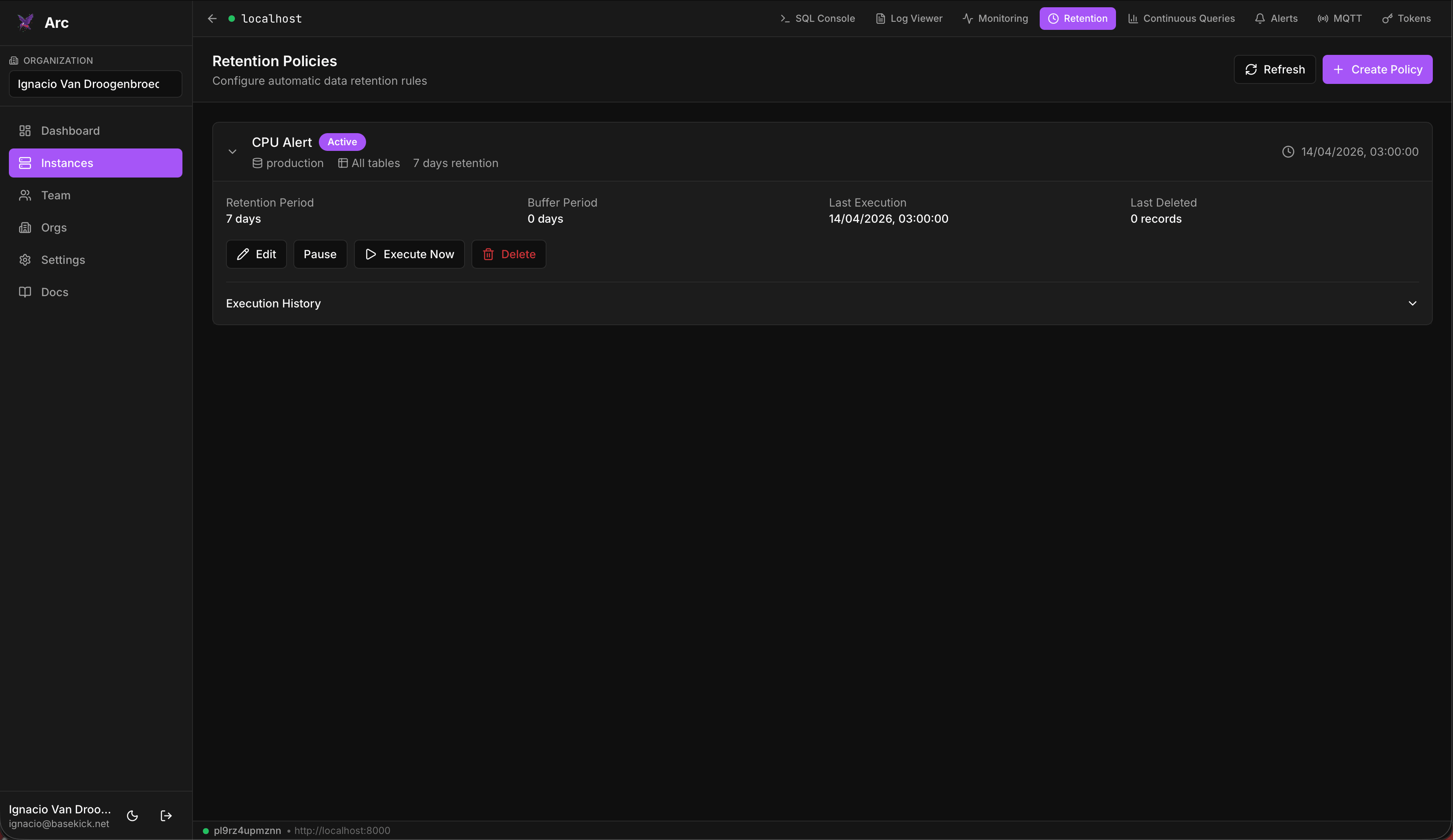
Create a policy
Click Create Policy and configure:
| Field | Description |
|---|---|
| Database | Which database the policy applies to. |
| Measurement | Optional. A specific measurement (table); leave it as All measurements to cover the whole database. |
| Retention Period (days) | How long to keep data. Anything older than the cutoff becomes eligible for deletion. |
| Buffer Period (days) | An optional grace window beyond the retention period before data is actually removed. |
| Enable policy immediately | Whether the policy runs on its own, or is created paused. |
Dry-run before you delete
Before anything is removed, Launchpad runs a dry-run for you. Opening Execute Now first shows Dry-Run Results: the records and files the policy would delete, the cutoff date, and the affected measurements, so you're never guessing about the blast radius. Review it, then confirm to execute for real. When the dry-run finds nothing to delete, the execute button stays disabled.
Run and manage
Each policy card shows its target (database + measurement), retention period, buffer period, last execution time, and last-deleted count. From the card you can:
- Edit: change the periods or scope
- Pause / Activate: toggle whether it runs automatically
- Execute Now: dry-run, then run it on demand
- Delete: remove the policy
An expanded policy card also lists its past runs.
Requires admin
Retention management drives Arc's admin API, so the connection must use an admin-scoped token. See Connecting to Arc.
Availability
If the tab reports that retention policies are not available, retention isn't enabled on that Arc instance. Enable the retention section in its arc.toml and reconnect.
Logs & monitoring
Two console tabs with different jobs: Log Viewer reads the log data you ingest into Arc, with pattern detection and trace extraction; Monitoring reports Arc's own instance health.
Continuous queries
Schedule rollups in Arc from the Continuous Queries tab: pick a source measurement, an aggregation window, and a destination, then run one on demand or let it run continuously.