
Trino
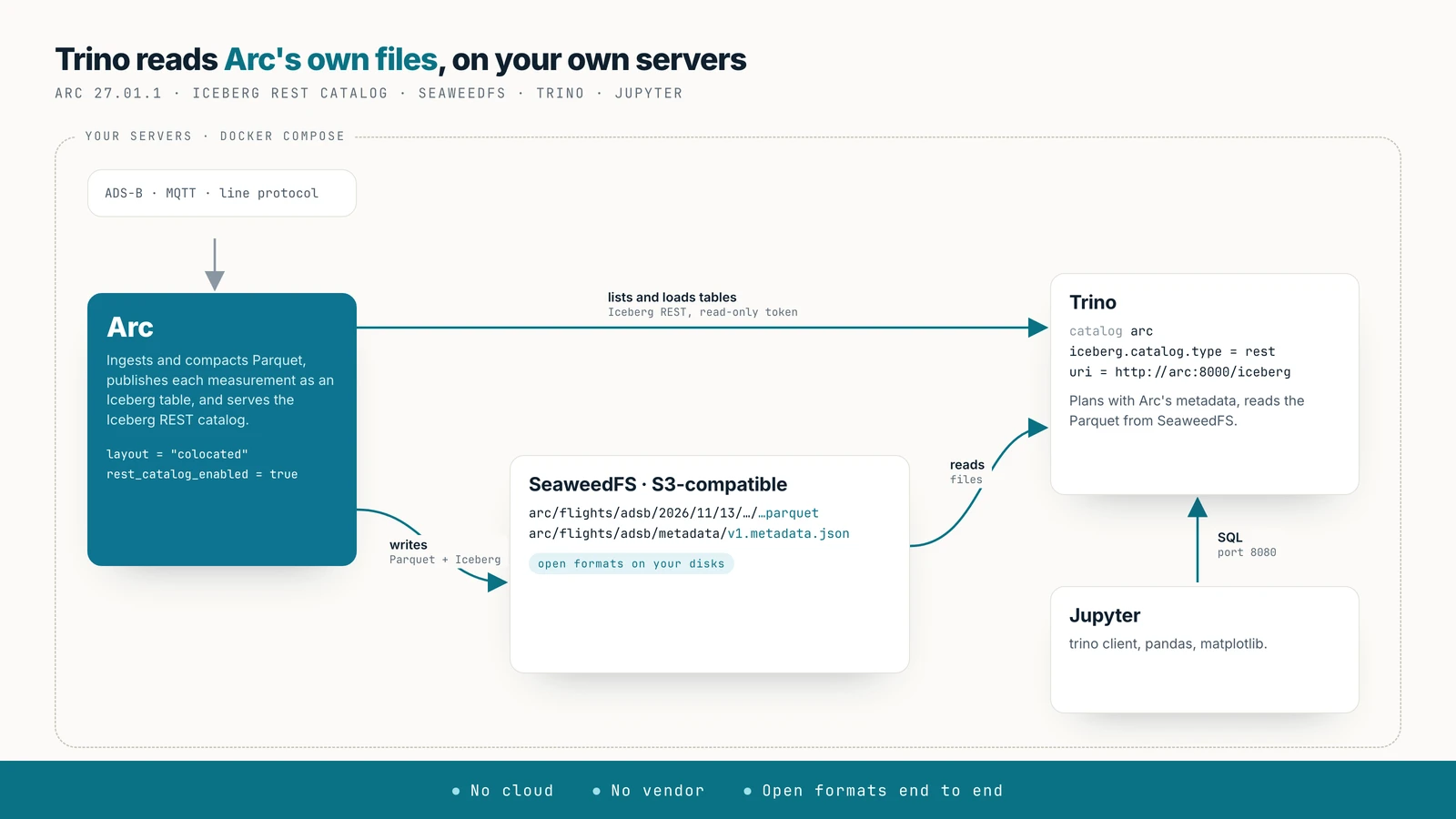
Query Arc's data with Trino on your own servers: Arc stores Parquet in S3-compatible storage such as SeaweedFS, publishes it as Apache Iceberg and serves its own Iceberg REST catalog, and Trino reads the files in place. A complete on-prem stack in one Docker Compose file, with a Python notebook for analysis.
Run Trino on Arc's data without a cloud account. Arc writes Parquet to S3-compatible storage you host, describes it as Apache Iceberg tables, and serves those tables through its own Iceberg REST catalog. Trino asks Arc's catalog where each table is and reads the files in place. Every component is open source and runs on your hardware, and the data stays in open formats from end to end.
Availability
Arc 27.01.1 or later. Every step below was run with Docker Compose on one machine: SeaweedFS 4.47, Trino 484 and a Jupyter notebook, on a day of ADS-B aircraft positions over New York.
What you get
- One catalog, Arc's own. No Hive Metastore, Nessie or Glue to run: Arc serves the Iceberg REST catalog at
/iceberg, read-only, and Trino's Iceberg connector speaks it natively. - Arc's files, read in place. Trino reads the Parquet that Arc wrote, from your object store. Nothing is exported or copied.
- Least privilege on both sides. Trino gets an Arc token that can only read, and storage keys that can only read.
1. The stack
Three files in one directory. First, SeaweedFS's S3 identities: one for Arc, which writes, and one for Trino, which can only read.
{
  "identities": [
    { "name": "arc",
      "credentials": [{ "accessKey": "arc", "secretKey": "<arc-secret>" }],
      "actions": ["Admin", "Read", "Write", "List", "Tagging"] },
    { "name": "trino",
      "credentials": [{ "accessKey": "trino", "secretKey": "<trino-secret>" }],
      "actions": ["Read", "List"] }
  ]
}
Then the Compose file:
services:
  seaweedfs:
    image: chrislusf/seaweedfs:4.47
    command: server -s3 -s3.config=/etc/seaweedfs/s3.json -dir=/data -volume.max=0
    volumes:
      - ./seaweedfs/s3.json:/etc/seaweedfs/s3.json:ro
      - seaweed-data:/data
    ports: ["8333:8333"]

  arc:
    image: ghcr.io/basekick-labs/arc:27.01.1
    depends_on: [seaweedfs]
    environment:
      ARC_AUTH_ENABLED: "true"
      ARC_AUTH_BOOTSTRAP_TOKEN: ${ARC_TOKEN}          # at least 32 characters
      ARC_STORAGE_BACKEND: s3
      ARC_STORAGE_S3_BUCKET: arc
      ARC_STORAGE_S3_ENDPOINT: seaweedfs:8333
      ARC_STORAGE_S3_USE_SSL: "false"
      ARC_STORAGE_S3_PATH_STYLE: "true"
      ARC_STORAGE_S3_REGION: us-east-1
      ARC_STORAGE_S3_ACCESS_KEY: arc
      ARC_STORAGE_S3_SECRET_KEY: ${ARC_S3_SECRET}
      ARC_ICEBERG_ENABLED: "true"
      ARC_ICEBERG_LAYOUT: colocated
      ARC_ICEBERG_REST_CATALOG_ENABLED: "true"
    ports: ["8000:8000"]

  trino:
    image: trinodb/trino:484
    depends_on: [arc]
    volumes:
      - ./trino/catalog:/etc/trino/catalog:ro
    ports: ["8080:8080"]

  jupyter:
    image: quay.io/jupyter/scipy-notebook:2025-12-01
    command: start-notebook.py --IdentityProvider.token=''
    volumes:
      - ./notebooks:/home/jovyan/work
    ports: ["8888:8888"]

volumes:
  seaweed-data:
The Jupyter service is optional; it's where the analysis in step 5 runs. Its empty token suits a laptop only: on a shared machine, set one.
Start SeaweedFS and create Arc's bucket, then start Arc:
docker compose up -d seaweedfs
AWS_ACCESS_KEY_ID=arc AWS_SECRET_ACCESS_KEY=<arc-secret> \
  aws --endpoint-url http://localhost:8333 --region us-east-1 s3 mb s3://arc
docker compose up -d arc
Arc's log confirms the catalog: Iceberg REST catalog enabled (read-only): clients use uri=<arc base URL>/iceberg.
2. Data, and a token for Trino
Write to Arc as usual. The examples use a day of ADS-B positions in the database flights, measurement adsb. Arc exports each measurement on its next pass (every 5 minutes by default), and the table appears in the catalog as arc_flights.adsb.
Create a token for Trino that can only read:
curl -X POST http://localhost:8000/api/v1/auth/tokens \
  -H "Authorization: Bearer $ARC_TOKEN" -H "Content-Type: application/json" \
  -d '{"name": "trino", "description": "Trino REST catalog", "permissions": ["read"]}'
The catalog answers this token, and Arc refuses any write made with it. The catalog lists only what the token can read; with RBAC, the token's roles decide which databases and measurements Trino sees.
3. The Trino catalog
One properties file makes Arc a Trino catalog called arc:
connector.name=iceberg
iceberg.catalog.type=rest
iceberg.rest-catalog.uri=http://arc:8000/iceberg
iceberg.rest-catalog.security=OAUTH2
iceberg.rest-catalog.oauth2.token=<trino token from step 2>
fs.native-s3.enabled=true
s3.endpoint=http://seaweedfs:8333
s3.path-style-access=true
s3.region=us-east-1
s3.aws-access-key=trino
s3.aws-secret-key=<trino-secret>
iceberg.rest-catalog.security=OAUTH2 with a token sends Arc's token as a bearer token; Trino doesn't call an OAuth server. The s3.* keys are SeaweedFS's read-only identity: with them, Trino reads Arc's files and can't write a byte.
docker compose up -d trino4. Query from Trino
Open the CLI with docker compose exec -it trino trino. Arc's databases are Trino schemas (arc_<database>), and its measurements are tables:
SHOW SCHEMAS FROM arc;
SHOW TABLES FROM arc.arc_flights;
SELECT count(*) AS positions, count(DISTINCT icao24) AS aircraft FROM arc.arc_flights.adsb;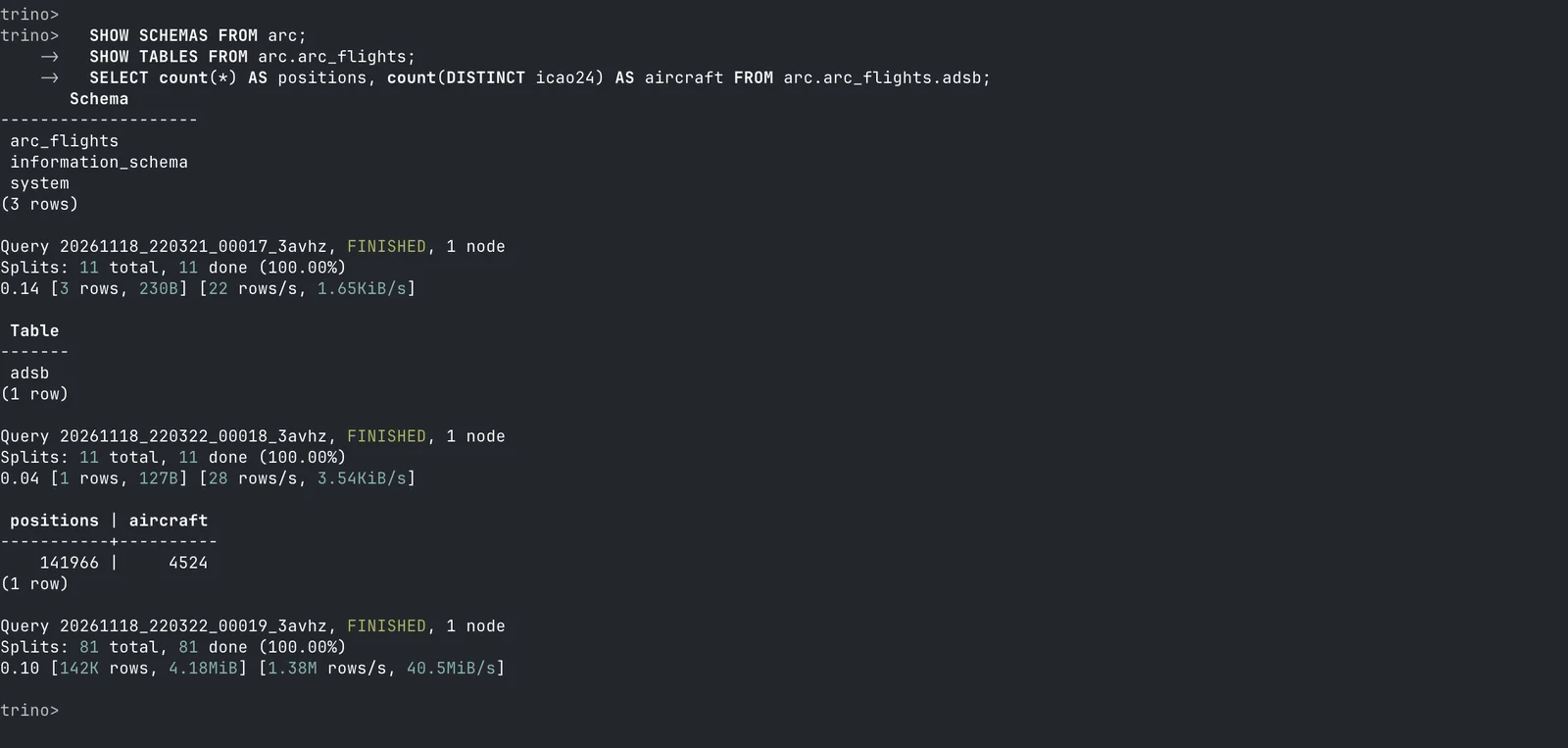
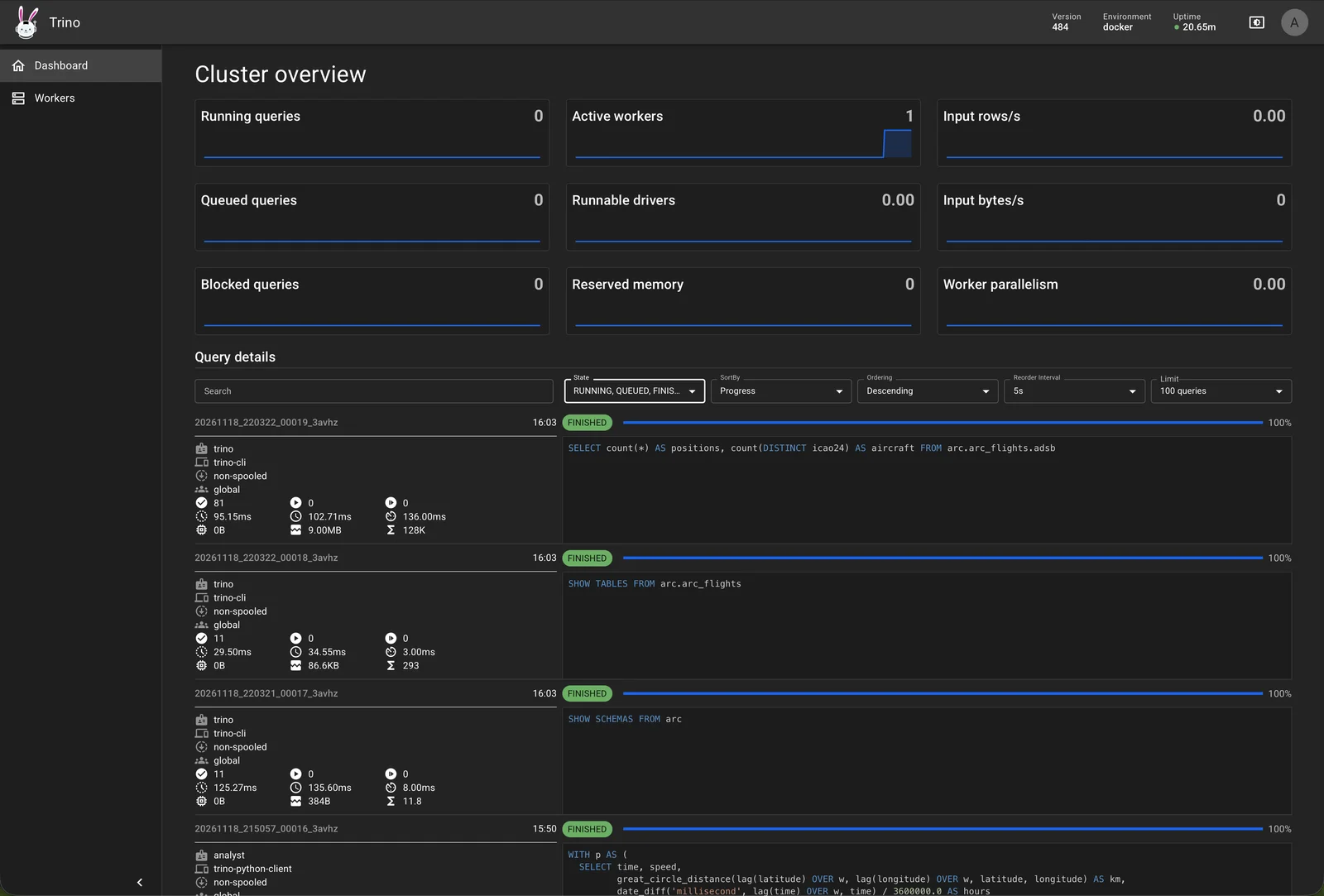
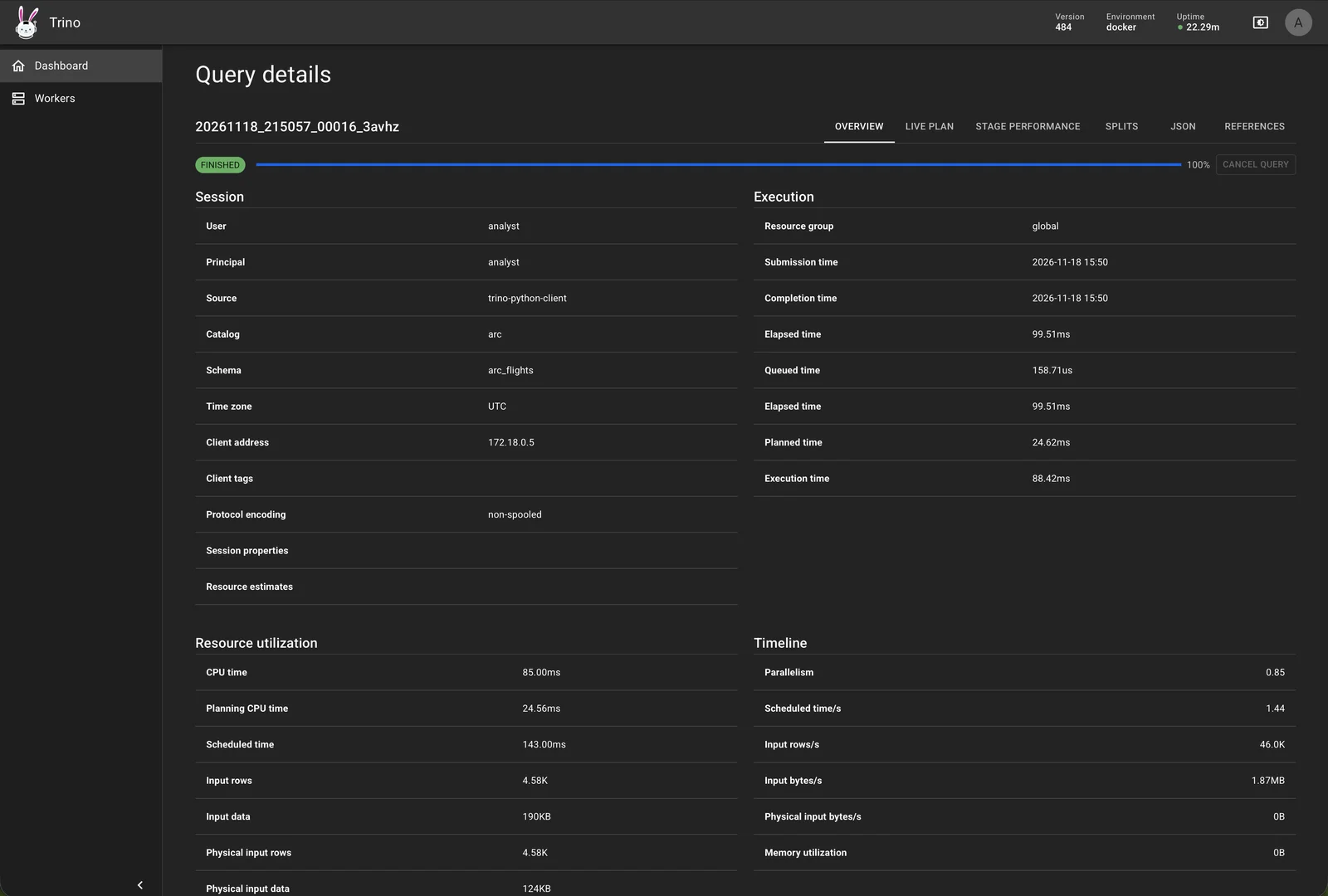
Trino's web UI (http://localhost:8080/ui, any user name) shows each query: its catalog, schema, source and the rows it read from Arc's files.
5. Analyse in Python
The trino package connects any Python tool to the same catalog. In the notebook:
%pip install -q trino

import trino, pandas as pd, matplotlib.pyplot as plt

conn = trino.dbapi.connect(host="trino", port=8080, user="analyst",
                           catalog="arc", schema="arc_flights")

def q(sql):
    cur = conn.cursor()
    cur.execute(sql)
    return pd.DataFrame(cur.fetchall(), columns=[c[0] for c in cur.description])
Count aircraft per hour on two Fridays, a normal one and the one with the FAA's nationwide ground stop, and plot them:
hourly = q('''
SELECT hour(time AT TIME ZONE 'America/New_York') AS hour_ny,
       count(DISTINCT icao24) FILTER (WHERE date(time AT TIME ZONE 'America/New_York') = DATE '2026-11-06') AS nov_6,
       count(DISTINCT icao24) FILTER (WHERE date(time AT TIME ZONE 'America/New_York') = DATE '2026-11-13') AS nov_13
FROM adsb GROUP BY 1 ORDER BY 1''')

fig, ax = plt.subplots(figsize=(11, 4.5))
ax.plot(hourly.hour_ny, hourly.nov_6, marker="o", label="Fri Nov 6 (normal)")
ax.plot(hourly.hour_ny, hourly.nov_13, marker="o", label="Fri Nov 13")
ax.legend(); plt.show()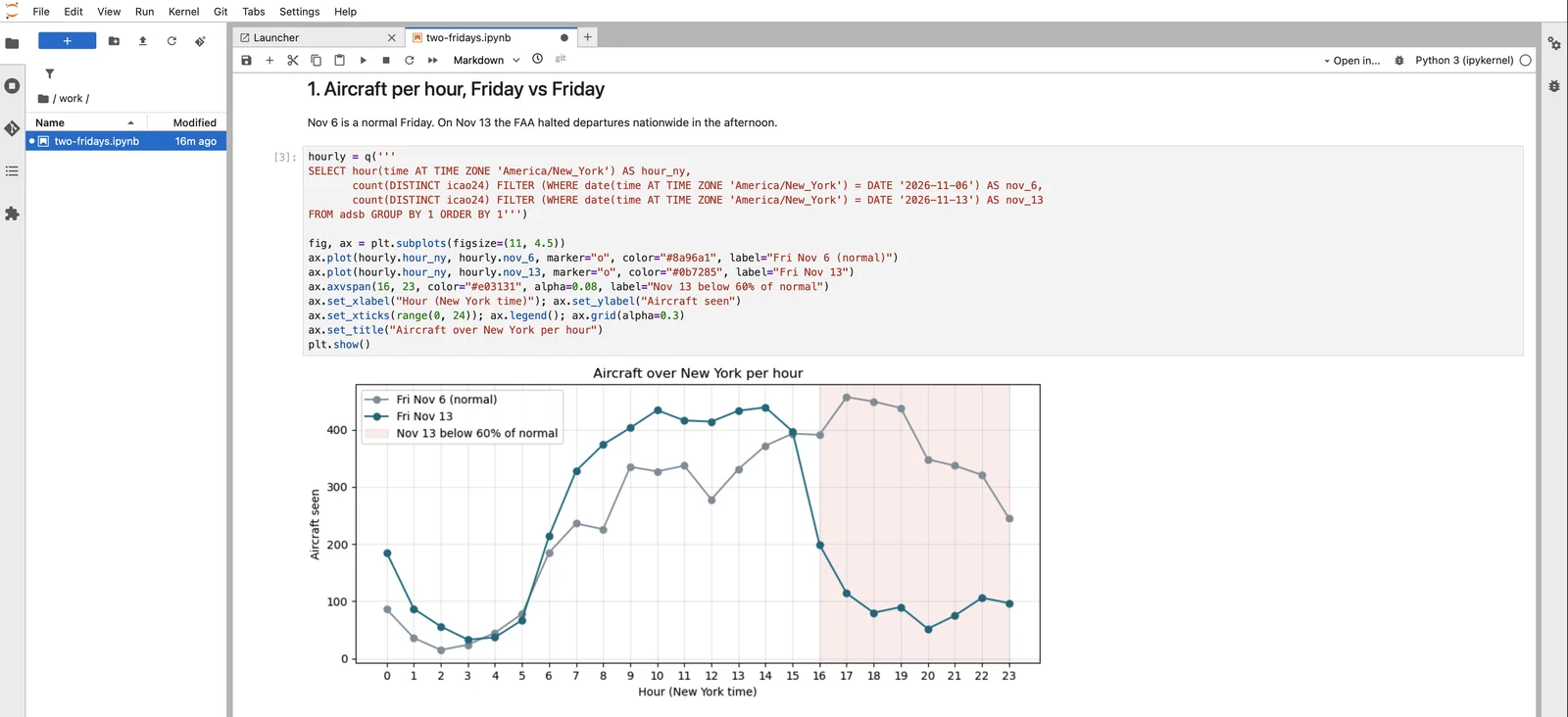
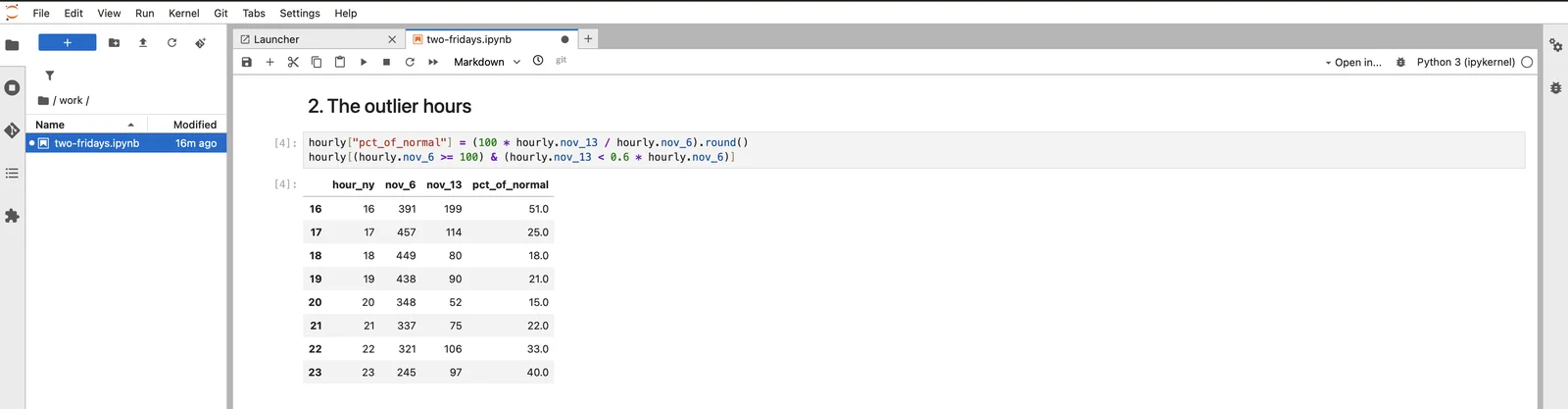
Outliers are a filter on the result:
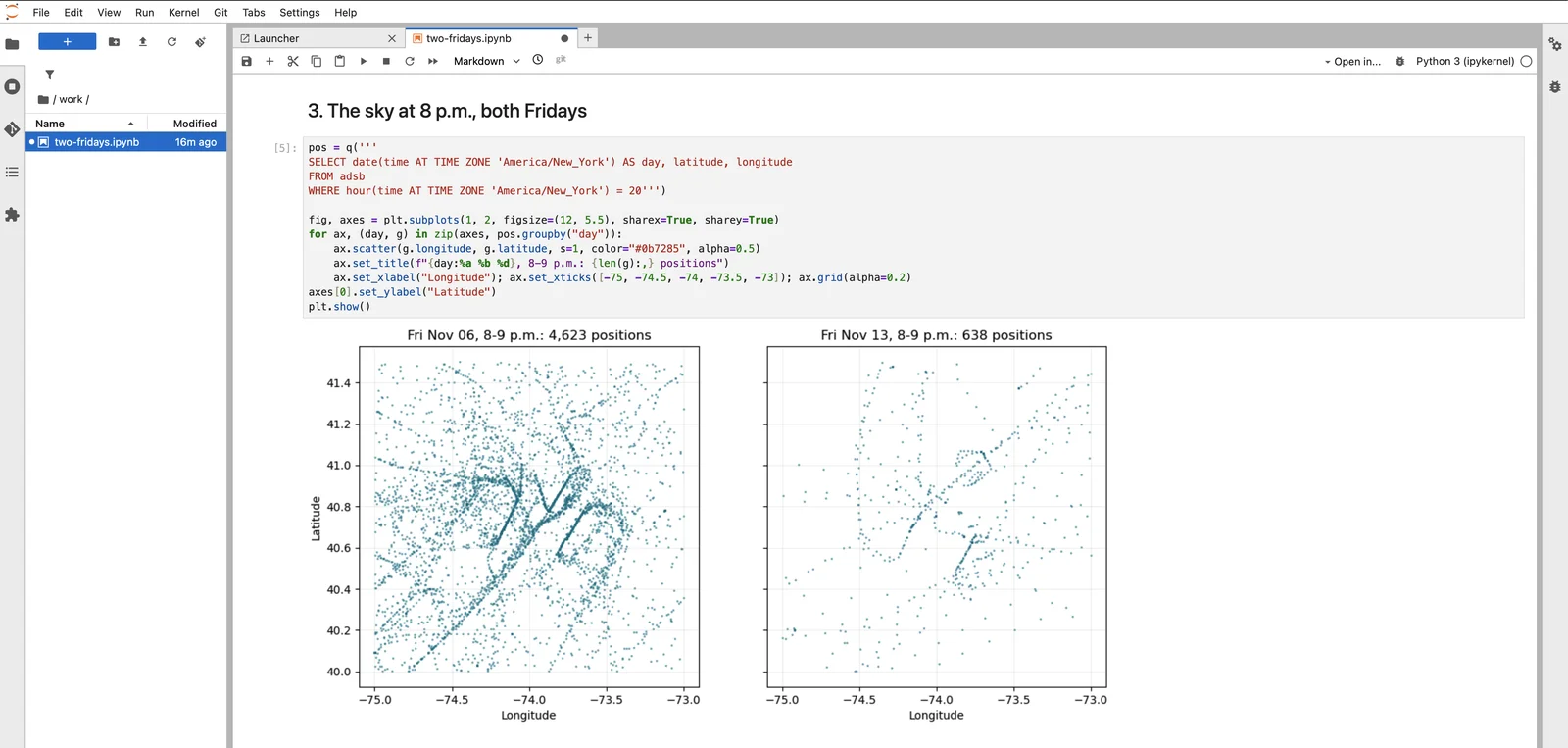
Window functions find a different kind of outlier: one in the data, not the sky. Comparing the speed implied by consecutive positions with the speed each aircraft reports exposes three polls in which the feed served frozen positions:
WITH p AS (
  SELECT time, speed,
         great_circle_distance(lag(latitude) OVER w, lag(longitude) OVER w, latitude, longitude) AS km,
         date_diff('millisecond', lag(time) OVER w, time) / 3600000.0 AS hours
  FROM adsb
  WINDOW w AS (PARTITION BY icao24 ORDER BY time))
SELECT date_trunc('minute', time) AS poll,
       approx_percentile(km / hours * 0.539957 / speed, 0.5) AS implied_over_reported
FROM p WHERE hours > 0 AND speed > 100
GROUP BY 1 ORDER BY 1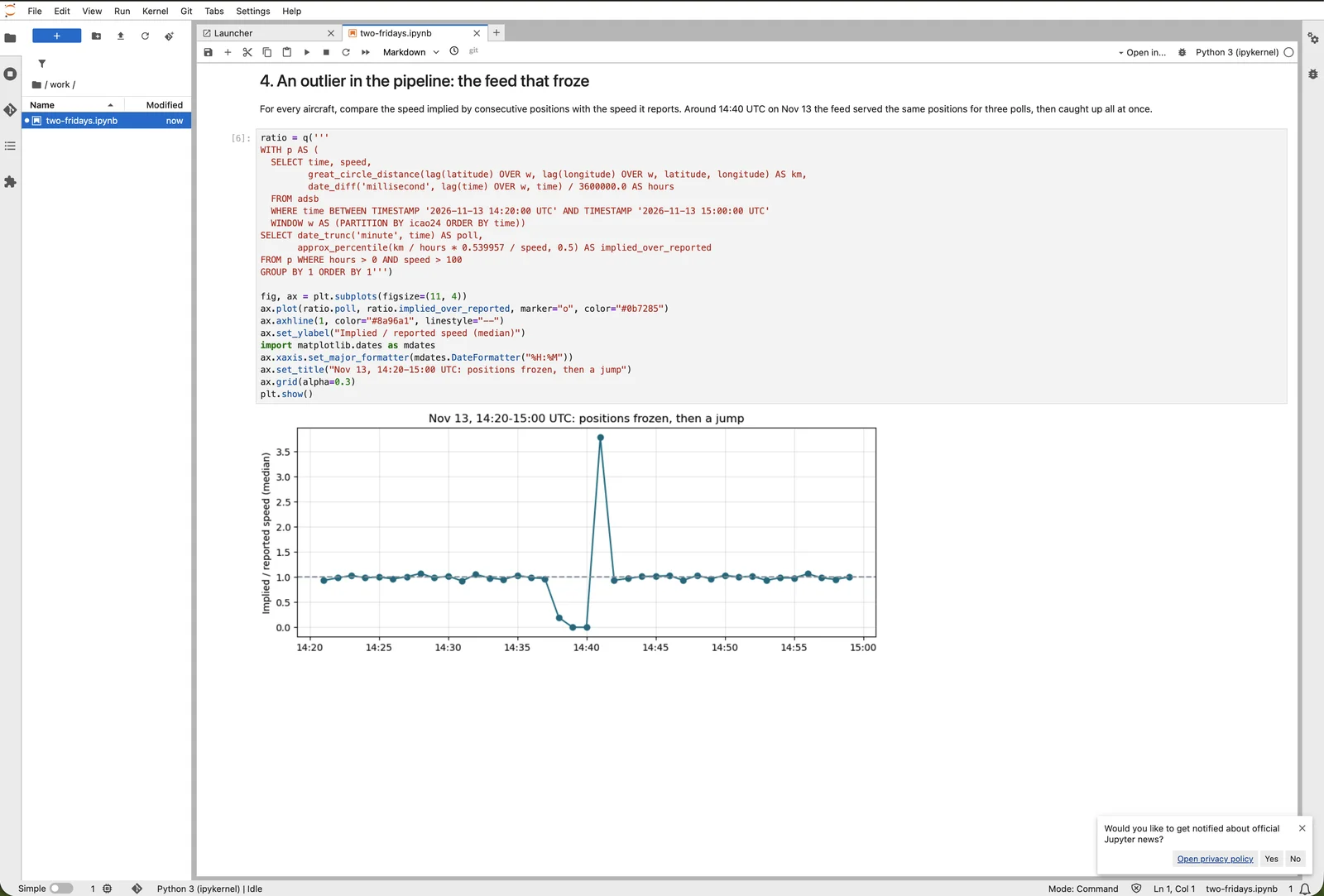
Keeping it current
There is nothing to refresh in Trino. Arc publishes a new table version on each export pass that finds changed files (iceberg.reconcile_interval, 300 seconds by default), and every Trino query loads the current version from Arc's catalog. New measurements appear as new tables; catalog listings are cached for up to 30 seconds.
Limits
- Read only. The catalog refuses writes (
406), and Trino's storage key can't write. Never runremove_orphan_filesorexpire_snapshotsfrom Trino on these tables: with the colocated layout the table's folder is Arc's data folder. - One schema per measurement. A column whose type differs between files stops the export of that table; Arc logs the column and both types.
See Through Arc's REST catalog for what the catalog serves, its caching and its behaviour in a cluster.
Snowflake
Query Arc's data in Snowflake without copying it: Snowflake reads Arc's Iceberg tables through Arc's own REST catalog or through AWS Glue, and its Parquet files through a read-only external volume. Step by step in Snowsight, from the IAM role to a Streamlit map.
Microsoft Fabric and Power BI
Bring Arc data into Microsoft Fabric with a notebook that reads Arc's Arrow query endpoint, write it to a Lakehouse table, and build a Power BI report on it, all in the browser.