
Clustering & High Availability
Configure an Arc Enterprise cluster: assign writer, reader, and compactor roles, set seeds and Raft addresses, tune peer file replication and catch-up, and enable writer failover.
Scale Arc horizontally with multi-node clusters. Separate write, read, and compaction workloads across dedicated nodes with automatic failover.
Overview
Arc Enterprise clustering uses a role-based architecture where each node in the cluster serves a specific purpose:
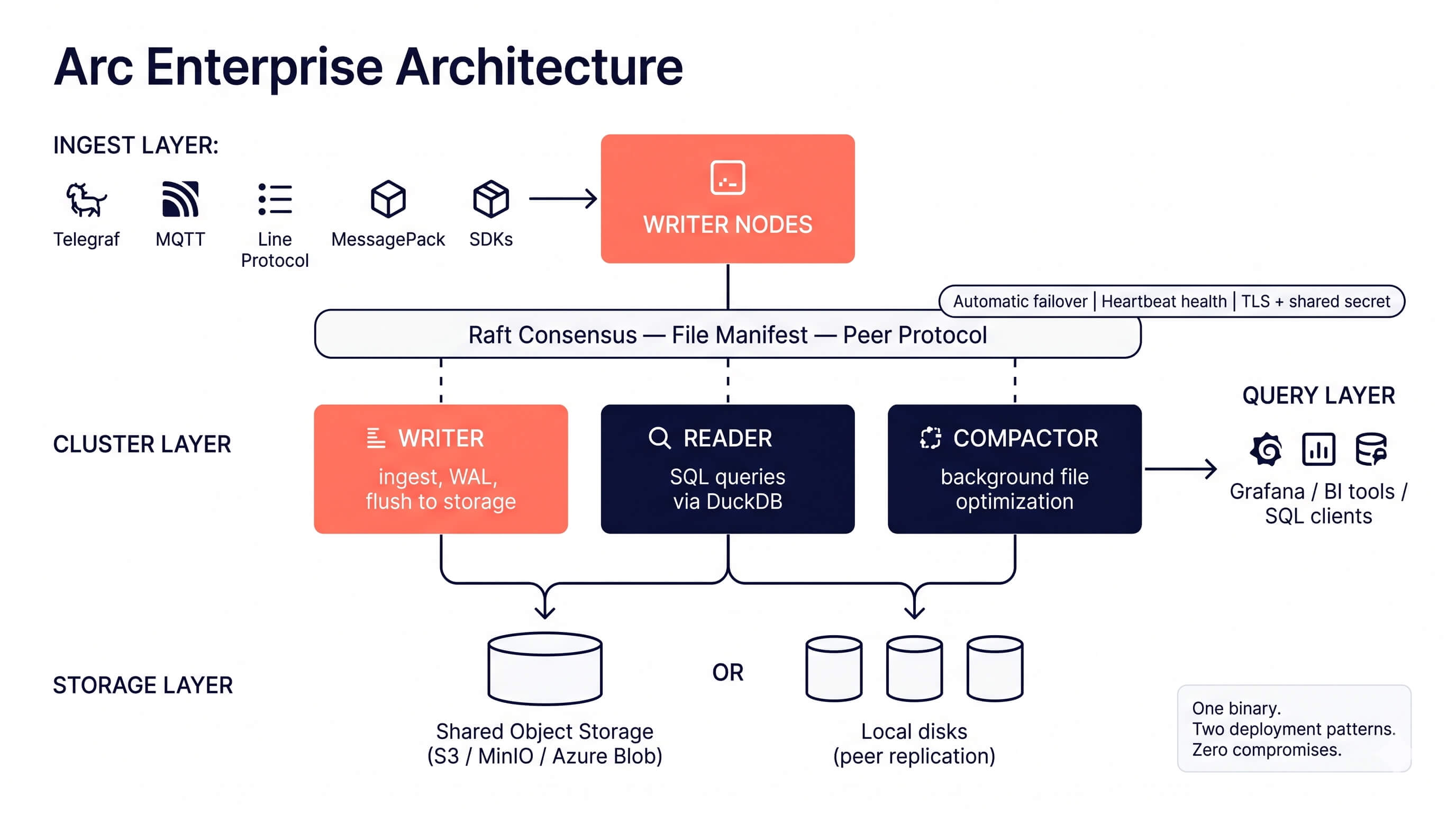
Node roles
| Role | Purpose | Capabilities |
|---|---|---|
| writer | Handles data ingestion and WAL | Ingest, coordinate |
| reader | Serves queries from shared storage | Query |
| compactor | Runs background file optimization | Compact |
| standalone | Single-node mode (default) | All capabilities |
- Writers receive data via the ingestion API, buffer it, and flush Parquet files to shared storage. WAL replication ensures durability.
- Readers query Parquet directly from shared storage. Scale readers horizontally to handle more concurrent queries.
- Compactors run hourly and daily file compaction in the background without impacting write or read performance.
Configuration
TOML configuration
[cluster]
enabled = true
node_id = "writer-01"           # Unique identifier for this node
role = "writer"                 # writer, reader, compactor, standalone
cluster_name = "production"     # Cluster identifier
seeds = ["10.0.1.10:9000", "10.0.1.11:9000"]  # Seed nodes for discovery
coordinator_addr = ":9000"      # Address for inter-node communication
health_check_interval = 10      # Health check interval (seconds)
heartbeat_interval = 5          # Heartbeat interval (seconds)
replication_enabled = true      # Enable WAL replication to readers
query_gate_on_catchup = false   # See "Query gating during replication catch-up" below
replication_catchup_enabled = true            # Walk the manifest on startup and pull what is missing
replication_catchup_barrier_timeout_ms = 30000 # Bound on the pre-walk sync with the leader (see below)
Environment variables
ARC_CLUSTER_ENABLED=true
ARC_CLUSTER_NODE_ID=writer-01
ARC_CLUSTER_ROLE=writer
ARC_CLUSTER_CLUSTER_NAME=production
ARC_CLUSTER_SEEDS=10.0.1.10:9000,10.0.1.11:9000
ARC_CLUSTER_COORDINATOR_ADDR=:9000
ARC_CLUSTER_HEALTH_CHECK_INTERVAL=10
ARC_CLUSTER_HEARTBEAT_INTERVAL=5
ARC_CLUSTER_REPLICATION_ENABLED=true
ARC_CLUSTER_REPLICATION_CATCHUP_ENABLED=true
ARC_CLUSTER_REPLICATION_CATCHUP_BARRIER_TIMEOUT_MS=30000
ARC_CLUSTER_QUERY_GATE_ON_CATCHUP=false
Query gating during replication catch-up
In a local-storage cluster with peer replication, a reader node may serve queries before its background puller has finished pulling all the Parquet files the cluster manifest references. Without gating, those queries silently return partial results: the manifest knows about the missing files, but read_parquet() globs against local storage and only finds what's already on disk. WAL replication (added in 26.05.1) closes part of this gap for unflushed writer data, but flushed Parquet files still depend on the asynchronous puller.
cluster.query_gate_on_catchup (added in 26.06.1, off by default) closes the remaining gap. When enabled, all user-facing read endpoints return 503 Service Unavailable until peer file replication has fully converged on this node.
What "fully converged" means
The gate is scoped to the startup catch-up batch only — not to all pull activity on the node. This distinction matters: in a busy cluster, steady-state ingest constantly puts new files in flight, and a naive "wait for everything to settle" predicate would mean the reader returns 503 every few seconds in normal operation. The gate's job is "the reader has finished bootstrapping its view of the manifest as of startup," not "no pulls are happening anywhere right now."
A node is considered ready when all of the following are true:
- The startup catch-up walker has finished its pass over the manifest.
- No paths the walker tagged are still in flight (
catchup_inflight == 0). Steady-state pulls from reactive FSM callbacks are deliberately excluded. - No catch-up-batch pulls failed after retries (
catchup_failed == 0). - No catch-up-batch pulls were dropped due to queue saturation (
catchup_dropped == 0).
Since 26.09.2 the walker also checks the files this node originated instead of assuming it still holds them: a node that comes back with an empty data disk under the same cluster.node_id pulls its own files back from a peer's replica as part of the same batch, so the gate covers them too. On such a cluster the reconciler's orphan-manifest sweep waits for this convergence before it proposes anything and reports a held sweep as manifest_sweep_held in the run (#959).
Failures and drops outside the catch-up window do not keep the gate red. They're operational concerns surfaced via puller stats but not correctness blockers — by the time the catch-up batch has settled, the reader has reconciled its view of the manifest as of walker start. Steady-state failures are handled by reactive FSM callbacks (which re-enqueue), the Phase 5 reconciler, and operator alerting via the cumulative failed / dropped counters.
Self-heal: catch-up failures and drops both clear without a process restart, in two ways. When a later pull succeeds for a previously-affected path (a reactive FSM callback re-enqueueing after the underlying issue resolves, or a subsequent catch-up scan), the corresponding scoped counter decrements and the gate re-opens automatically. And when the entry is removed from the cluster manifest, whether by retention, compaction, the reconciliation sweep, or an operator, the reader forgets it: a recorded failure or drop is cleared, a pull still queued or in flight for it is dropped from the catch-up batch, and the gate re-opens at once (since 26.09.2, #759). That second path is the remedy for an entry no peer can serve, for example a file that was lost on every node, which no later pull will ever fix: the reconciliation sweep on the origin writer (reconciliation.enabled, or POST /api/v1/reconciliation/trigger?dry_run=false&act=true) removes such entries. A key no backend can address has no automated remover yet (retention cannot read it and the sweep only reports it); that class waits on the operator delete endpoint tracked in #794. The puller tracks affected paths in dedicated sets so it can attribute either event back to the original failure or drop. Pulls abandoned because their entry left the manifest are counted in skipped_gone, in the 503 body and in replication_catchup_status on /api/v1/cluster.
Both catchup_failed and catchup_dropped are surfaced in the 503 body so operators see exactly what happened. The /api/v1/cluster/status endpoint also exposes the cumulative failed / dropped / pulled / skipped_dup keys with their original whole-puller-lifetime semantics (preserved for dashboards landed before #392), alongside the new catchup_* keys for gate-relevant numbers. So dashboards can distinguish "the catch-up batch had a hiccup" (catchup_failed > 0) from "the puller has been having steady-state problems for hours" (failed >> catchup_failed).
The same switch turns off the own-file re-pull and the reconciler's manifest-sweep hold: a node restored with an empty data disk does not pull back the files it originated, and its reconciliation runs are not held while it is missing them. Keep reconciliation in dry run after such a restore, or re-enable the walker first.
Endpoints affected
When the gate is enabled and the node is still catching up, these endpoints return 503:
POST /api/v1/queryPOST /api/v1/query/arrowPOST /api/v1/query/estimateGET /api/v1/query/:measurementGET /api/v1/measurements
Internal endpoints (cache invalidation, cluster status, replication-control APIs) are deliberately not gated — peer nodes need them to fire during catch-up.
503 response shape
{
  "success": false,
  "error": "replication_catch_up_in_progress",
  "message": "Reader is still catching up on replicated files. Retry shortly or check /api/v1/cluster for catch-up progress.",
  "catchup_status": {
    "started_at": 1714912800,
    "completed_at": 0,
    "entries_walked": 1287,
    "enqueued": 1287,
    "catchup_inflight": 2,
    "catchup_failed": 0,
    "catchup_dropped": 0,
    "queue_depth": 7,
    "inflight_count": 2,
    "pulled": 1278
  }
}
A Retry-After: 5 header is also set so HTTP-aware load balancers and clients can back off automatically.
completed_at = 0 means the catch-up walker is still enumerating; once it flips non-zero, watch queue_depth + inflight_count go to zero. Non-zero catchup_failed or catchup_dropped means the gate stays closed until a later pull of that path succeeds or the entry is removed from the cluster manifest; the 503 body and the reader's log name the paths, and the reconciliation sweep (POST /api/v1/reconciliation/trigger) is the supported way to remove entries whose file no node holds.
Observability
- Cumulative gate fires:
QueryHandler.QueryGate503Total()is exposed for Prometheus / metrics scrapes. Alert on a non-zero rate to detect that the gate is firing without inferring from generic HTTP error logs. - Sampled log line: while the gate is active, Arc emits at most one
WARNlog per second with the gate counter and request path. Avoids flooding under sustained catch-up while still surfacing the degraded state. - Live status: the
/api/v1/clusterendpoint exposesreplication_catchup_statuswith the same fields shown in the 503 body, so dashboards can show catch-up progress without waiting for a query to fail.
Syncing with the leader before the walk
Before the startup walk, the node waits until its manifest reflects everything the leader had committed at that moment, so a restarted reader does not walk a half-replayed manifest. The leader uses Raft's own barrier; a follower forwards a barrier entry through the leader and waits for it to be applied locally (since 26.09.2, #799). The gate stays closed while it waits. cluster.replication_catchup_barrier_timeout_ms (default 30000) bounds that wait; it has to outlast the leader's replication backoff toward a node that was down for a while (up to about ten seconds) and, on a node that was far behind, a snapshot install. On timeout the node logs proceeding against possibly-stale manifest with its applied, commit and last log index and walks anyway. In a mixed-version cluster an older leader rejects the barrier and the reader falls back to that same path: upgrade writers before readers.
Known limitation
There is a sub-millisecond window between the Raft FSM committing a RegisterFile entry and the puller's Enqueue callback firing. A query landing in that window can observe ReplicationReady() == true while a manifest entry from the same Raft commit is not yet in the in-flight set. Closing this gap requires a per-query Raft LastApplied() barrier on the query path, which is out of scope for this gate.
The gate's contract is "every file the puller has observed has been pulled," not "every file the manifest currently contains has been pulled." In practice this means the gate may unblock a fraction of a second before the very last files committed before the gate-clear are queryable. This is a tracked follow-up.
Pattern A vs. Pattern B
- Shared object storage (Pattern A): the puller is disabled (
replication_enabled = false), soquery_gate_on_catchupis effectively a no-op — readers see the bucket directly and don't need to catch up. Safe to leave the flag at any value. - Local storage with peer replication (Pattern B): this is where the gate matters. Enable it on readers whose application cannot tolerate partial results during cold start or after a network partition.
Deployment example
A minimal 3-node cluster with one writer and two readers using Docker Compose:
# docker-compose.yml
version: "3.8"

services:
  # Shared storage (MinIO as S3-compatible backend)
  minio:
    image: minio/minio
    command: server /data --console-address ":9001"
    environment:
      MINIO_ROOT_USER: minioadmin
      MINIO_ROOT_PASSWORD: minioadmin123
    ports:
      - "9001:9001"

  # Writer node (primary)
  arc-writer:
    image: basekick/arc:latest
    environment:
      ARC_LICENSE_KEY: "ARC-XXXX-XXXX-XXXX-XXXX"
      ARC_STORAGE_BACKEND: minio
      ARC_STORAGE_S3_BUCKET: arc-data
      ARC_STORAGE_S3_ENDPOINT: minio:9000
      ARC_STORAGE_S3_ACCESS_KEY: minioadmin
      ARC_STORAGE_S3_SECRET_KEY: minioadmin123
      ARC_STORAGE_S3_USE_SSL: "false"
      ARC_STORAGE_S3_PATH_STYLE: "true"
      ARC_CLUSTER_ENABLED: "true"
      ARC_CLUSTER_NODE_ID: writer-01
      ARC_CLUSTER_ROLE: writer
      ARC_CLUSTER_CLUSTER_NAME: production
      ARC_CLUSTER_COORDINATOR_ADDR: ":9000"
      ARC_CLUSTER_REPLICATION_ENABLED: "true"
      ARC_AUTH_ENABLED: "true"
    ports:
      - "8000:8000"

  # Reader node 1
  arc-reader-1:
    image: basekick/arc:latest
    environment:
      ARC_LICENSE_KEY: "ARC-XXXX-XXXX-XXXX-XXXX"
      ARC_STORAGE_BACKEND: minio
      ARC_STORAGE_S3_BUCKET: arc-data
      ARC_STORAGE_S3_ENDPOINT: minio:9000
      ARC_STORAGE_S3_ACCESS_KEY: minioadmin
      ARC_STORAGE_S3_SECRET_KEY: minioadmin123
      ARC_STORAGE_S3_USE_SSL: "false"
      ARC_STORAGE_S3_PATH_STYLE: "true"
      ARC_CLUSTER_ENABLED: "true"
      ARC_CLUSTER_NODE_ID: reader-01
      ARC_CLUSTER_ROLE: reader
      ARC_CLUSTER_CLUSTER_NAME: production
      ARC_CLUSTER_SEEDS: arc-writer:9000
      ARC_AUTH_ENABLED: "true"
    ports:
      - "8001:8000"

  # Reader node 2
  arc-reader-2:
    image: basekick/arc:latest
    environment:
      ARC_LICENSE_KEY: "ARC-XXXX-XXXX-XXXX-XXXX"
      ARC_STORAGE_BACKEND: minio
      ARC_STORAGE_S3_BUCKET: arc-data
      ARC_STORAGE_S3_ENDPOINT: minio:9000
      ARC_STORAGE_S3_ACCESS_KEY: minioadmin
      ARC_STORAGE_S3_SECRET_KEY: minioadmin123
      ARC_STORAGE_S3_USE_SSL: "false"
      ARC_STORAGE_S3_PATH_STYLE: "true"
      ARC_CLUSTER_ENABLED: "true"
      ARC_CLUSTER_NODE_ID: reader-02
      ARC_CLUSTER_ROLE: reader
      ARC_CLUSTER_CLUSTER_NAME: production
      ARC_CLUSTER_SEEDS: arc-writer:9000
      ARC_AUTH_ENABLED: "true"
    ports:
      - "8002:8000"
High availability
Arc Enterprise's HA model depends on which deployment pattern you chose. Both deliver "writer crash recovered without operator intervention," but the mechanics are very different.
Pattern 2 — shared object storage (multi-writer)
When all nodes share an object-storage backend (S3, Azure Blob, MinIO), Arc Enterprise runs in multi-writer mode: N writer nodes accept writes concurrently behind a load balancer. There is no "primary writer" to fail over to — every writer is a peer, and the load balancer handles writer-crash recovery via its own health-check.
Key characteristics:
- Recovery time: immediate — the next request lands on a surviving writer via the LB
- Health-based detection: load balancer polls each writer's
/readyendpoint (Traefik, nginx, HAProxy, and cloud ALBs all support this out of the box) - No "promotion" step: all writers are equivalent for ingestion; nothing in the cluster has to elect a new "primary"
- Singleton background tasks (retention, continuous queries, deletes, tiered-storage migration) run on whichever node holds the cluster Raft leadership at the time. Raft re-election on leader death is sub-second and the new leader's next scheduler tick picks up the work.
Enable by setting cluster.shared_storage_mode = true (env: ARC_CLUSTER_SHARED_STORAGE_MODE). The Helm chart sets this automatically when storage.mode=shared. Requires an Enterprise license that includes the shared_storage_multi_writer feature.
Deploy 3 writers for full HA. The load balancer routes around a failed writer, and with three of them the cluster still has a spare afterwards. 2 writers is refused by the Helm chart: the second writer is the only spare, so the first failure consumes it and no writer can be drained for a rolling upgrade. 1 writer is fine for development but has no HA, and this pattern suppresses Raft writer promotion on purpose, so losing it stops ingest until an operator restores it. Arc logs a rate-limited warning while a cluster is below three writer-role nodes.
Put an L7 load balancer in front of the writers — an ingress controller
(nginx, Traefik), Envoy/HAProxy, or a cloud ALB — and send all write clients
through it. Each request is then balanced independently and write traffic
spreads evenly across writers. Use the plain Service only as the backend the
L7 layer targets, never as the client-facing endpoint of a multi-writer
cluster.
When a writer crashes:
- The writer's
/readyendpoint stops responding (or returns 503). - The load balancer marks the writer unhealthy and stops routing to it within one poll cycle (~5–10 s).
- New writes route to the surviving writer(s). No in-cluster failover action required.
- In-flight buffer on the crashed writer (records that arrived in memory but had not yet been flushed to S3) is lost. Records that completed the S3 PUT before the crash are durable.
- On writer restart, the local WAL replays any un-flushed entries into the new Arrow buffer before
/readyflips back to 200 and the load balancer resumes routing.
Pattern 1 — local storage with peer replication
When each node has its own local storage, one writer at a time takes ingest, because the data is not shared: a second active writer would hold rows no other node can see. Arc elects that writer and promotes a replacement when it fails.
Deploy three writer-role nodes. The failover pool is made of writer-role nodes, not readers. One is elected primary and takes ingest; the other two replicate and stand by. Readers serve queries and replicate the WAL, but they are not promotion candidates, so a deployment with a single writer cannot fail over at all, and two absorbs exactly one failure before it is back to a single writer with nothing left to promote. Arc logs a rate-limited warning while a cluster is below three writer-role nodes.
Leave cluster.failover_enabled off and there is no primary election at all: nothing promotes a replacement, and every writer-role node treats itself as the primary for retention, continuous queries, deletes and tiered-storage migration. Arc warns about that shape specifically. Enable failover before adding writers to a local-storage cluster.
Key characteristics:
- Recovery time: less than 30 seconds
- Health-based detection: continuous health monitoring with configurable thresholds
- Automatic promotion: a standby writer is promoted via Raft consensus (
CommandPromoteWriterFSM apply) - Cooldown protection: prevents rapid failover flapping
Enable by setting cluster.failover.enabled = true (env: ARC_CLUSTER_FAILOVER_ENABLED). Requires the writer_failover license feature. Set cluster.replication_enabled=true on the standby writers and the readers so both keep a real-time copy of the primary's WAL.
When the primary writer fails:
- Health checks detect the failure.
- The Raft leader selects a healthy standby writer.
- The selected node is promoted via
CommandPromoteWriterRaft apply. - Write traffic re-routes to the new primary (clients reconnect, or the load balancer picks up its
/ready=200).
Both patterns want three writer-role nodes. In shared storage all three take traffic; in local storage two of them stand by. Either way, three is what lets the cluster lose one node and still elect a leader.
See Deployment Patterns for the full trade-off comparison.
Membership after a restart
Every node keeps two views of the cluster: the Raft-committed node table, written by the authenticated join and restored with each Raft snapshot, and an in-memory registry that the health checker, the heartbeat fan-out, the node listings and the file puller read. On a restart the node table comes back with the snapshot; the registry is rebuilt from it as the snapshot is restored and from any node-added entries replayed after it, so a restarted leader authorises forwarded writes from its followers, heartbeats them and lists them without any of them re-joining (since 26.09.2, #807). A follower whose cluster.seeds is empty, or whose discovery ran after Raft already knew the leader, therefore no longer needs a re-join either: the leader answers its forwarded writes from the node table, and the follower resolves the leader's address from its own copy of it.
Before 26.09.2 the leader consulted only its registry, which a snapshot restore did not refill, so after a whole-cluster restart followers that had not re-joined got unknown node on every forwarded write. A write on such a follower still returned success, because ingestion is local, but the file never reached the manifest. If a cluster on an older release shows ForwardApply rejected: node not found in registry in the leader's log after a restart, restarting the affected follower with cluster.seeds set makes it re-join.
API reference
All cluster endpoints require admin authentication.
Get cluster status
curl -H "Authorization: Bearer $TOKEN" \
  http://localhost:8000/api/v1/cluster
Response:
{
  "success": true,
  "data": {
    "cluster_name": "production",
    "node_count": 3,
    "healthy_nodes": 3,
    "roles": {
      "writer": 1,
      "reader": 2,
      "compactor": 0
    }
  }
}
List cluster nodes
# All nodes
curl -H "Authorization: Bearer $TOKEN" \
  http://localhost:8000/api/v1/cluster/nodes

# Filter by role
curl -H "Authorization: Bearer $TOKEN" \
  "http://localhost:8000/api/v1/cluster/nodes?role=reader"

# Filter by state
curl -H "Authorization: Bearer $TOKEN" \
  "http://localhost:8000/api/v1/cluster/nodes?state=healthy"
Response:
{
  "success": true,
  "data": [
    {
      "id": "writer-01",
      "role": "writer",
      "state": "healthy",
      "address": "10.0.1.10:9000",
      "last_heartbeat": "2026-02-13T10:30:00Z"
    },
    {
      "id": "reader-01",
      "role": "reader",
      "state": "healthy",
      "address": "10.0.1.11:9000",
      "last_heartbeat": "2026-02-13T10:30:01Z"
    }
  ]
}
Get specific node
curl -H "Authorization: Bearer $TOKEN" \
  http://localhost:8000/api/v1/cluster/nodes/writer-01
Get local node info
curl -H "Authorization: Bearer $TOKEN" \
  http://localhost:8000/api/v1/cluster/local
Cluster health check
curl -H "Authorization: Bearer $TOKEN" \
  http://localhost:8000/api/v1/cluster/health
Response:
{
  "success": true,
  "data": {
    "status": "healthy",
    "node_id": "writer-01",
    "role": "writer",
    "cluster_name": "production"
  }
}
Best practices
-
Pick a deployment pattern — Use shared object storage (S3, MinIO, Azure) for cloud-native deployments, or local storage with peer replication for bare metal, VMs, and edge. Don't mix the two in the same cluster.
-
Size for HA based on pattern:
- Pattern 2 (shared storage): 3 writers behind a load balancer. The LB routes around a failed writer and a spare remains. Single writer is fine for dev; 2 is refused by the chart, because the first failure consumes the only spare.
- Pattern 1 (local storage): 3 writer-role nodes with
cluster.replication_enabled=true, one elected primary and two standing by, plus as many readers as your query load needs. Readers are never promoted, so they do not count toward writer redundancy.
-
Scale readers independently — Add reader nodes to handle increased query load without affecting write performance.
-
Use one dedicated compactor — Run compaction on a single dedicated node to avoid duplicate outputs. Enable
ARC_CLUSTER_FAILOVER_ENABLED=truefor automatic compactor failover. -
Configure seed nodes — Reader and compactor nodes should list writer nodes as seeds for cluster discovery.
-
Always set a shared secret —
ARC_CLUSTER_SHARED_SECRETis required for peer authentication. Arc refuses to start replication without it. -
Monitor cluster health — Use the
/api/v1/cluster/healthendpoint with your monitoring system (Prometheus, Grafana) to detect issues early.
Next steps
- RBAC — Secure your cluster with role-based access control
- Tiered Storage — Optimize storage costs with hot/cold tiering
- Audit Logging — Track all operations for compliance
Configuration Overview
Every arc.toml section for Arc Enterprise, including the license key, cluster, tiered_storage, audit_log, and governance blocks, plus the environment variables that override them.
Edge Sync with a Clustered Hub
What changes when an edge sync hub is an Arc Enterprise cluster: which node accepts the import, how Raft forwards the manifest command, and pinning a stable import endpoint.