
Databricks
Query Arc's data in Databricks without copying it: Arc publishes each measurement as an Apache Iceberg table and registers it in AWS Glue, and Unity Catalog reads it through a Glue foreign catalog. Step by step in the Databricks UI, from the IAM role to an AI/BI dashboard.
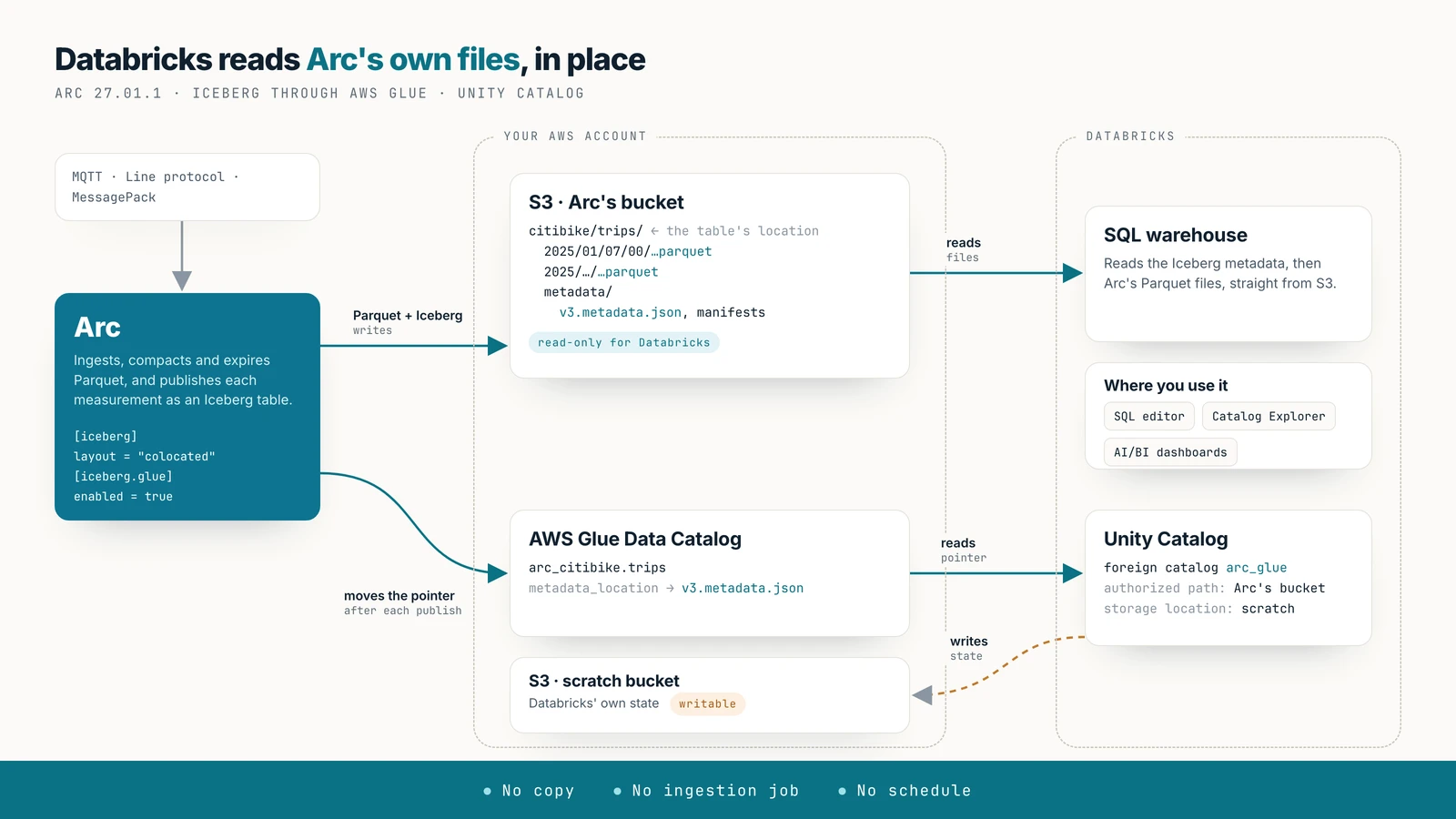
Query Arc's data in Databricks where it already is. Arc publishes each measurement as an Apache Iceberg table over its own Parquet files and registers it in AWS Glue. Unity Catalog reads Glue through a foreign catalog, so Databricks SQL, notebooks and AI/BI dashboards read Arc's files in your bucket. There is no copy, no ingestion job and no schedule.
Availability
Arc 27.01.1 or later, with an S3 primary on AWS (storage.backend = "s3"). Every step below was run on Databricks Free Edition (AWS, us-east-2).
Databricks federates a fixed list of catalogs, AWS Glue among them, not an arbitrary Iceberg REST catalog, so it reaches Arc through Glue rather than through Arc's own REST catalog.
Before you start
- Arc 27.01.1 on S3 in AWS. The guide uses a bucket called
my-arc-bucketinus-east-2. - A second, empty S3 bucket for Databricks' own use (
my-databricks-scratchbelow). Databricks needs a writable storage location to read Iceberg tables through Glue, and it should not be Arc's bucket. - A Databricks workspace on AWS with Unity Catalog. New workspaces have it, including Free Edition. You need to be able to create credentials, external locations, connections and catalogs; a workspace admin can.
- The same region for everything if you can: the buckets, Glue and the workspace. Every query reads Arc's files from S3.
The screenshots use the demo measurement citibike.trips: 5.2 million Citi Bike rides, a sample of 2025.
1. Configure Arc
Turn on the Iceberg export with the colocated layout, and the Glue registration:
[iceberg]
enabled = true
layout  = "colocated"

[iceberg.glue]
enabled = true
# region = "us-east-2"          # default: storage.s3_region
# catalog_id = "123456789012"   # default: the credentials' account
Or with environment variables: ARC_ICEBERG_ENABLED=true, ARC_ICEBERG_LAYOUT=colocated, ARC_ICEBERG_GLUE_ENABLED=true.
Databricks needs the colocated layout
Databricks reads only the files under a federated table's location. With the default warehouse layout, the table's location is a metadata directory and Arc's data files are elsewhere, so every read fails with AccessDeniedException. With colocated, the location is the measurement's own folder (my-arc-bucket/citibike/trips), which holds every data file. Tables created before you set the layout keep their old location; see Table layout.
The credentials Arc uses for S3 also call Glue. They need glue:GetDatabase, GetDatabases, CreateDatabase, GetTable, GetTables, CreateTable, UpdateTable and DeleteTable on the arc_* databases.
After Arc's next export pass (every 5 minutes by default), each measurement has a Glue table: database arc_<database>, table <measurement> in lowercase. Check with:
aws glue get-tables --database-name arc_citibike --query 'TableList[].Name'2. Create the IAM role for Databricks
Databricks reads Glue and S3 by assuming an IAM role in your account. Create one (say arc-databricks) with this permissions policy. It reads Glue, reads Arc's bucket, and writes only to the scratch bucket:
{
  "Version": "2012-10-17",
  "Statement": [
    { "Effect": "Allow",
      "Action": ["glue:GetDatabase", "glue:GetDatabases", "glue:GetTable", "glue:GetTables", "glue:GetPartitions"],
      "Resource": "*" },
    { "Effect": "Allow",
      "Action": ["s3:ListBucket", "s3:GetBucketLocation"],
      "Resource": ["arn:aws:s3:::my-arc-bucket", "arn:aws:s3:::my-databricks-scratch"] },
    { "Effect": "Allow",
      "Action": ["s3:GetObject", "s3:GetObjectVersion"],
      "Resource": "arn:aws:s3:::my-arc-bucket/*" },
    { "Effect": "Allow",
      "Action": ["s3:GetObject", "s3:PutObject", "s3:DeleteObject"],
      "Resource": "arn:aws:s3:::my-databricks-scratch/*" },
    { "Effect": "Allow",
      "Action": "sts:AssumeRole",
      "Resource": "arn:aws:iam::123456789012:role/arc-databricks" }
  ]
}
The last statement lets the role assume itself, which Unity Catalog requires. IAM needs a trust policy when you create the role; start with Unity Catalog's role and a placeholder external ID, and replace it with the one Databricks shows in the next step:
{
  "Version": "2012-10-17",
  "Statement": [
    { "Effect": "Allow",
      "Principal": { "AWS": "arn:aws:iam::414351767826:role/unity-catalog-prod-UCMasterRole-14S5ZJVKOTYTL" },
      "Action": "sts:AssumeRole",
      "Condition": { "StringEquals": { "sts:ExternalId": "0000" } } }
  ]
}
That ARN is Unity Catalog's role on AWS commercial regions; the dialog in step 3 shows the one for your workspace.
Read-only on Arc's bucket
Keep Databricks read-only on Arc's bucket. Glue accepts writes, and a DROP TABLE … PURGE, VACUUM or orphan-file cleanup through it deletes the data files the table names, which are Arc's own files.
3. Create the credentials
In Databricks, open Catalog → External Data → Credentials → Create credential. You create three, all with the role from step 2.
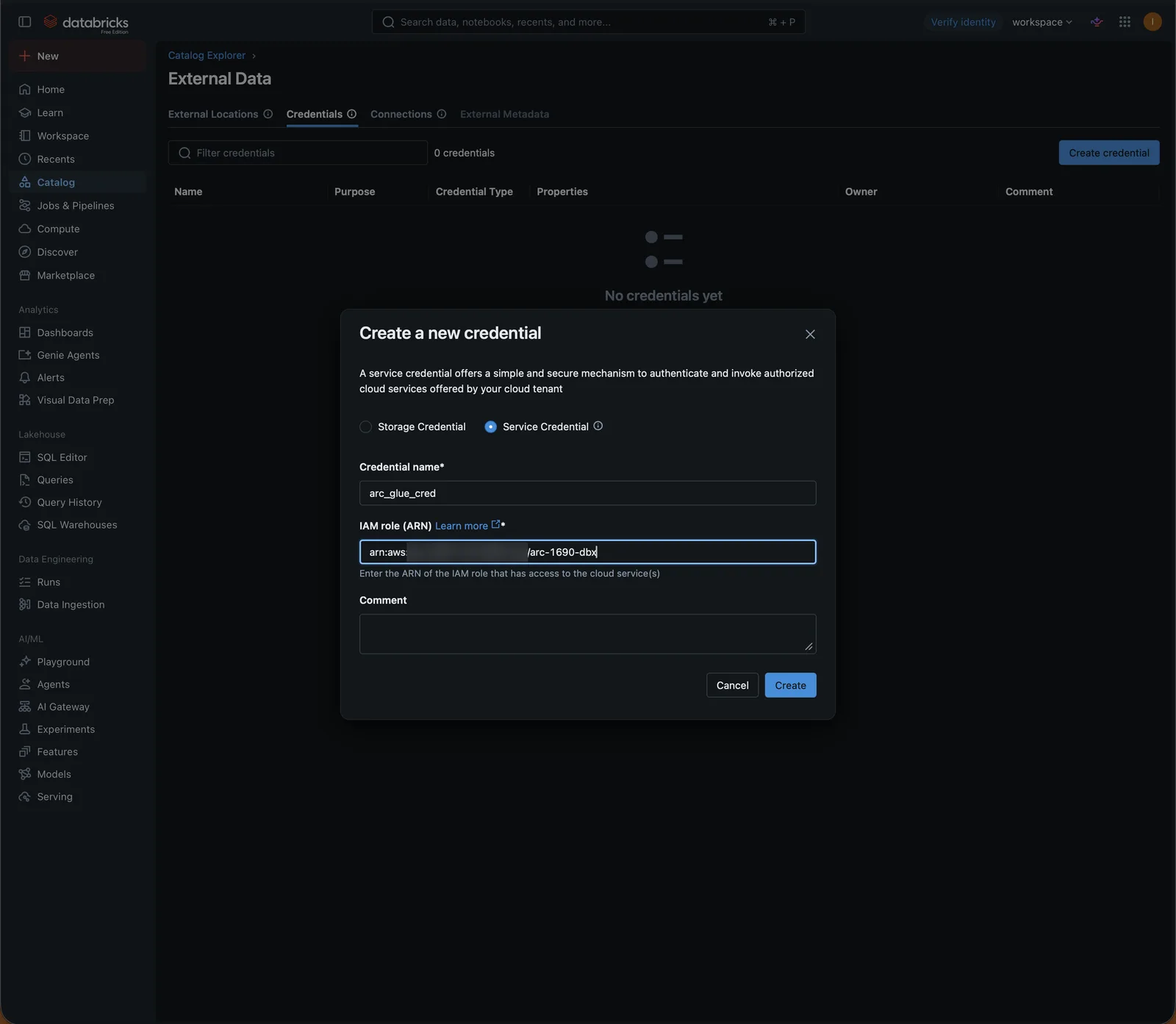
A service credential for Glue. Select Service Credential, name it arc_glue_cred and enter the role's ARN:
After Create, Databricks shows the trust policy the role needs: Unity Catalog's role and the role itself as principals, and an external ID. Paste it into the role's trust relationship in AWS:
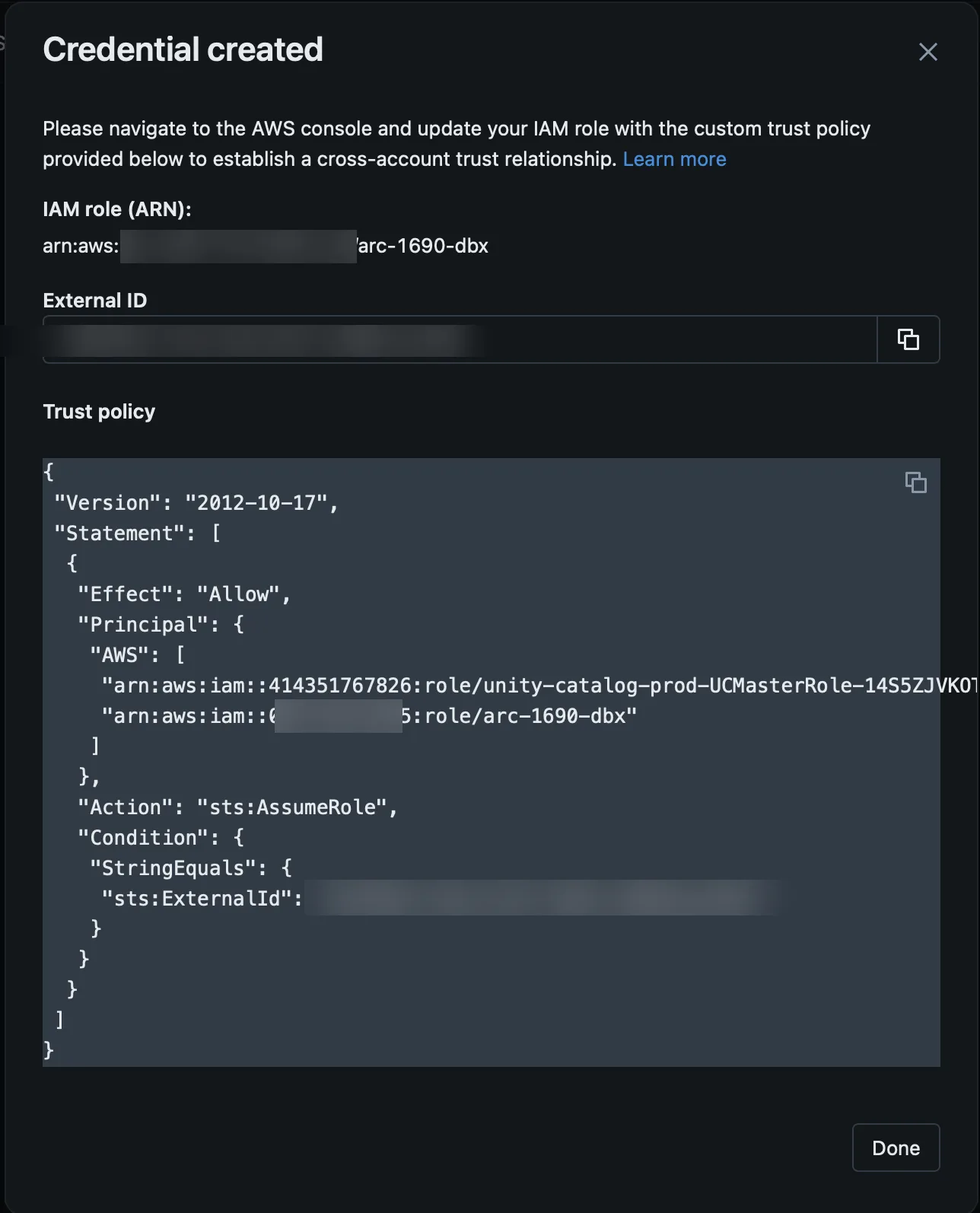
In our workspace all three credentials showed the same external ID, so the trust policy was set once. Check the dialog for each credential you create.
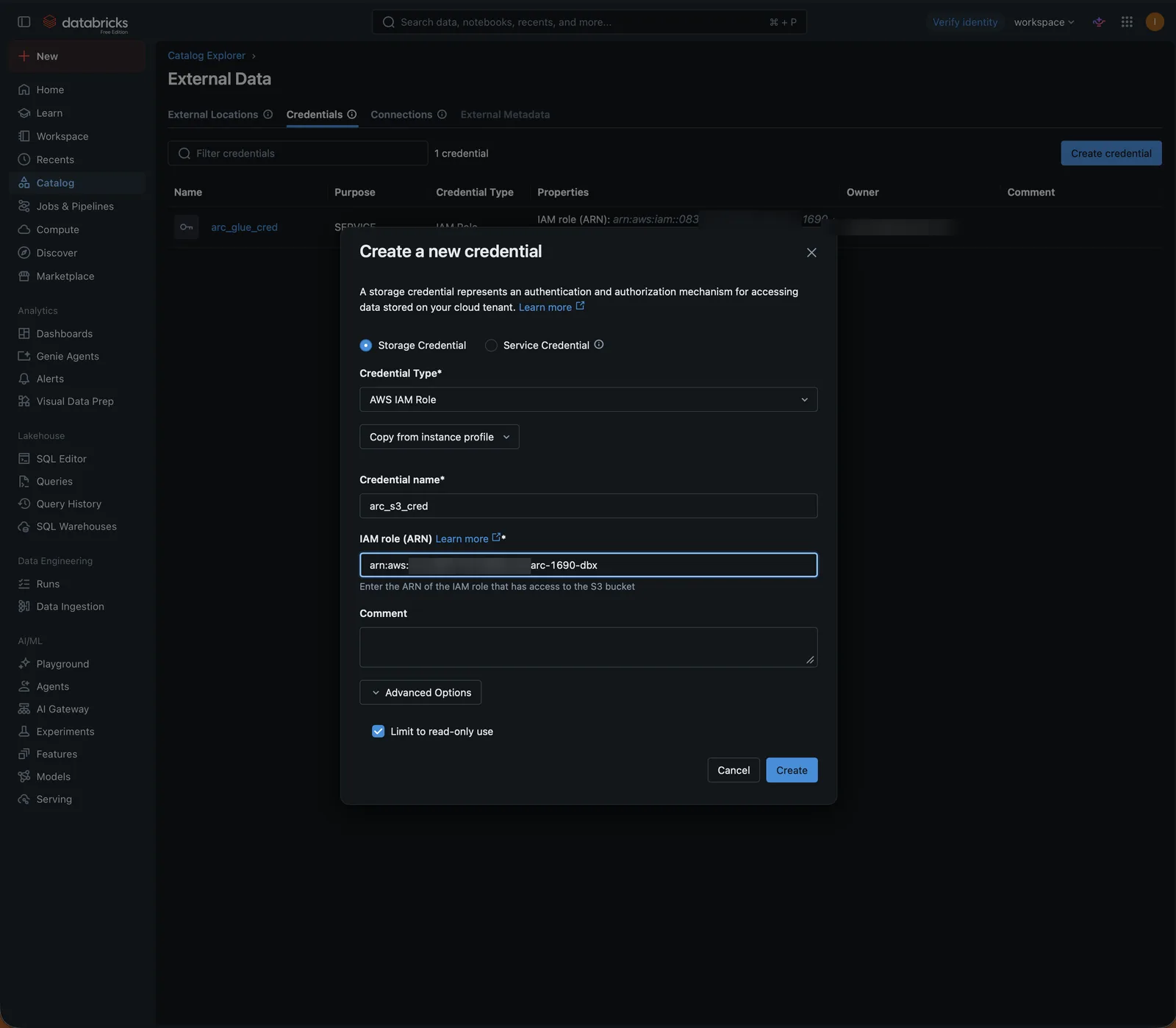
A read-only storage credential for Arc's bucket. Select Storage Credential, name it arc_s3_cred, same role, and under Advanced Options tick Limit to read-only use:
A writable storage credential for the scratch bucket. Same form, name arc_scratch_cred, without read-only.
4. Create the external locations
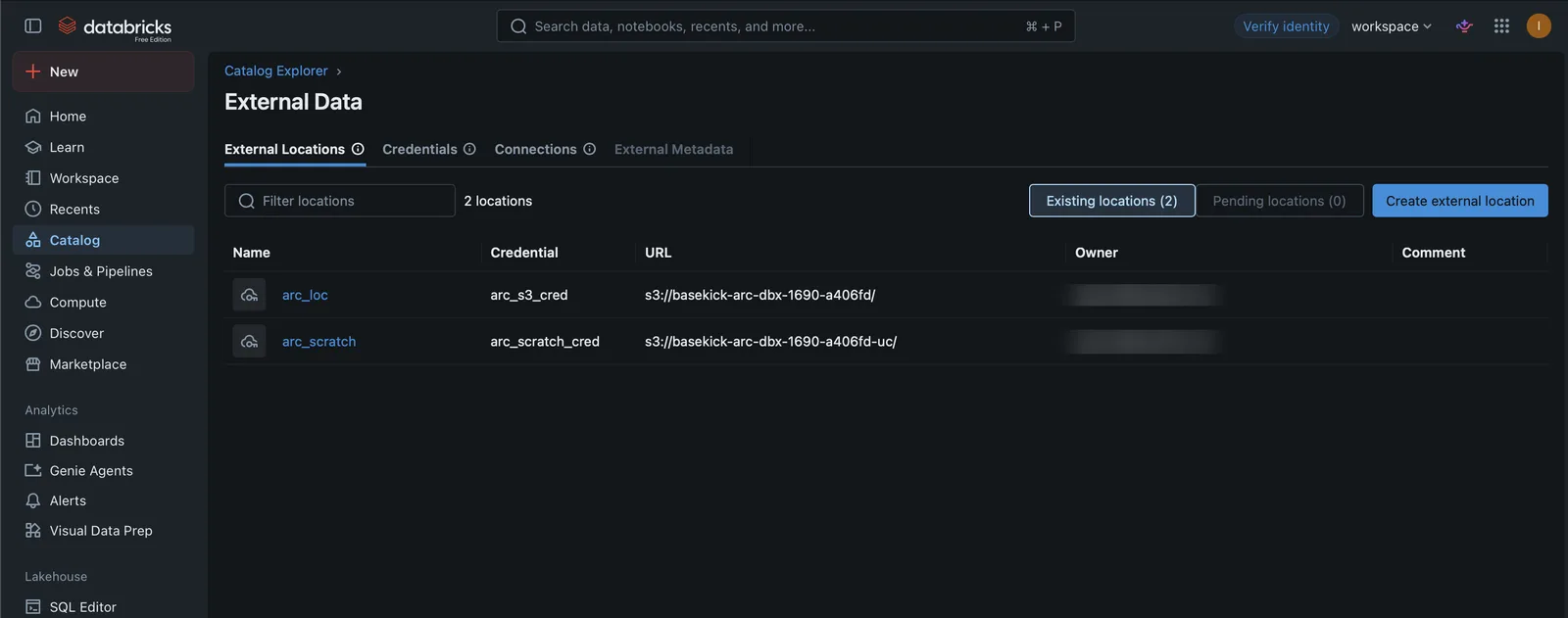
Open the External Locations tab → Create external location → Manual.
Arc's bucket, read-only. Name arc_loc, URL s3://my-arc-bucket/, credential arc_s3_cred. Read-only is ticked and greyed out, because the credential is read-only:
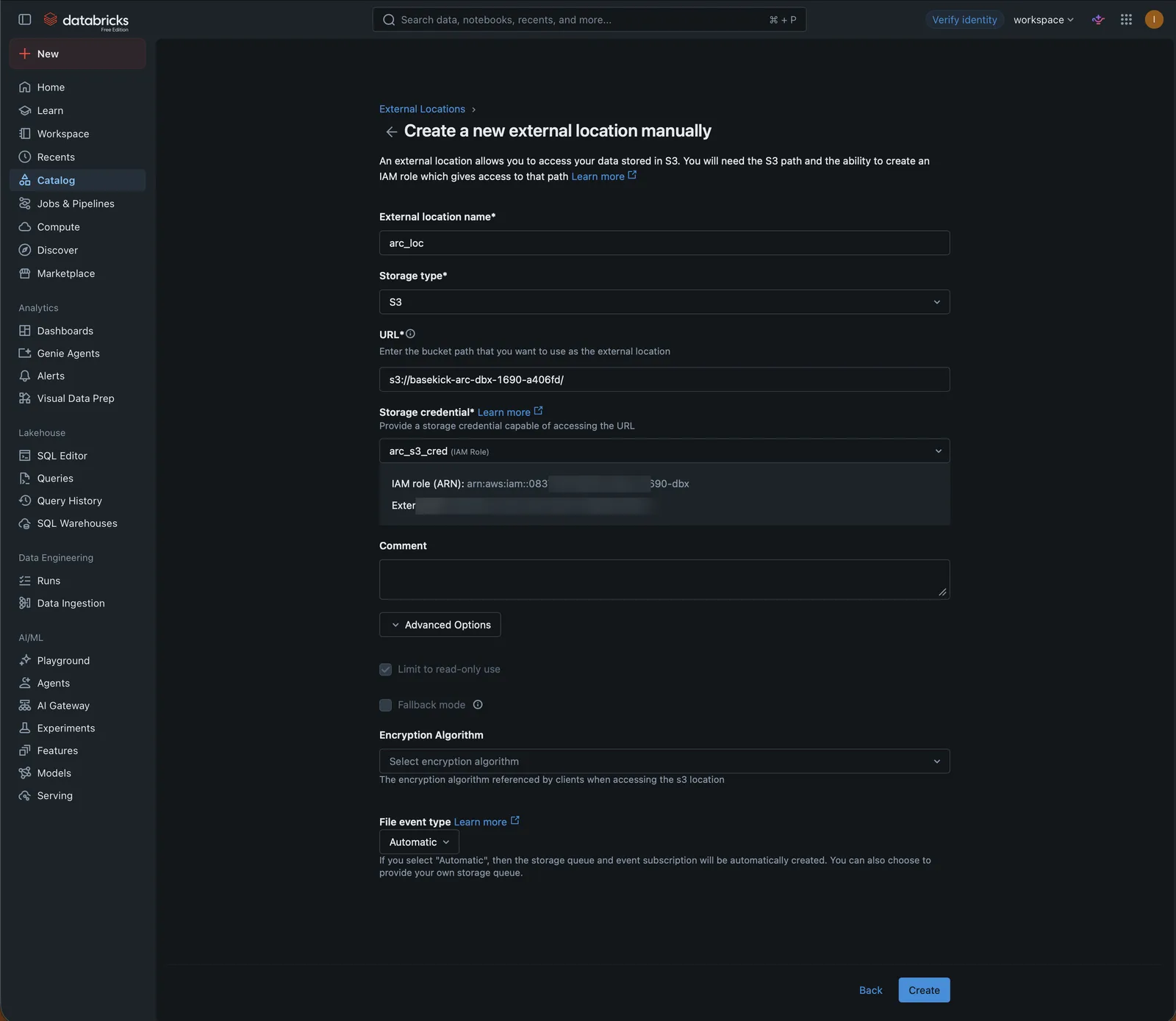
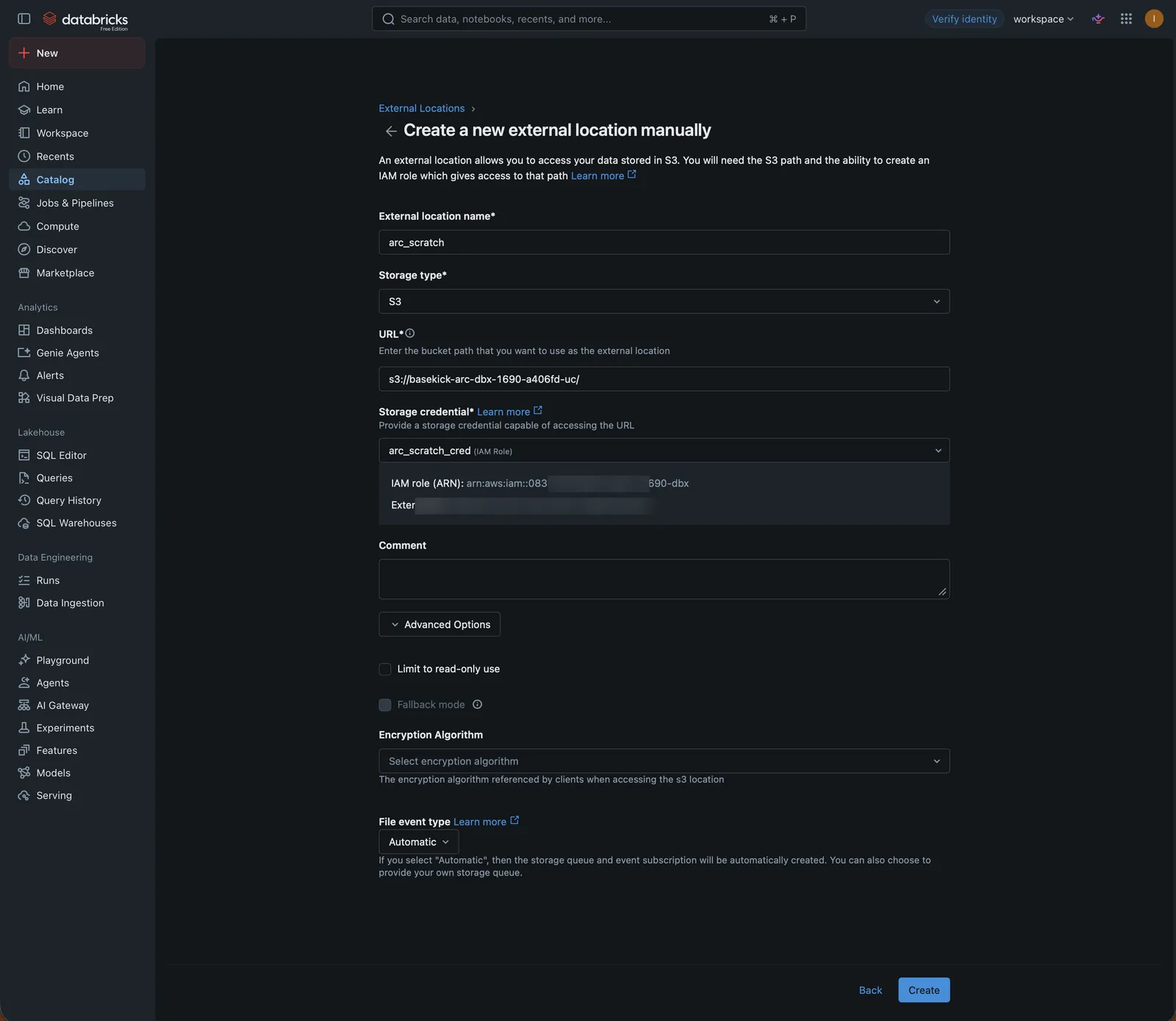
The scratch bucket, writable. Name arc_scratch, URL s3://my-databricks-scratch/, credential arc_scratch_cred:
5. Connect Glue and create the catalog
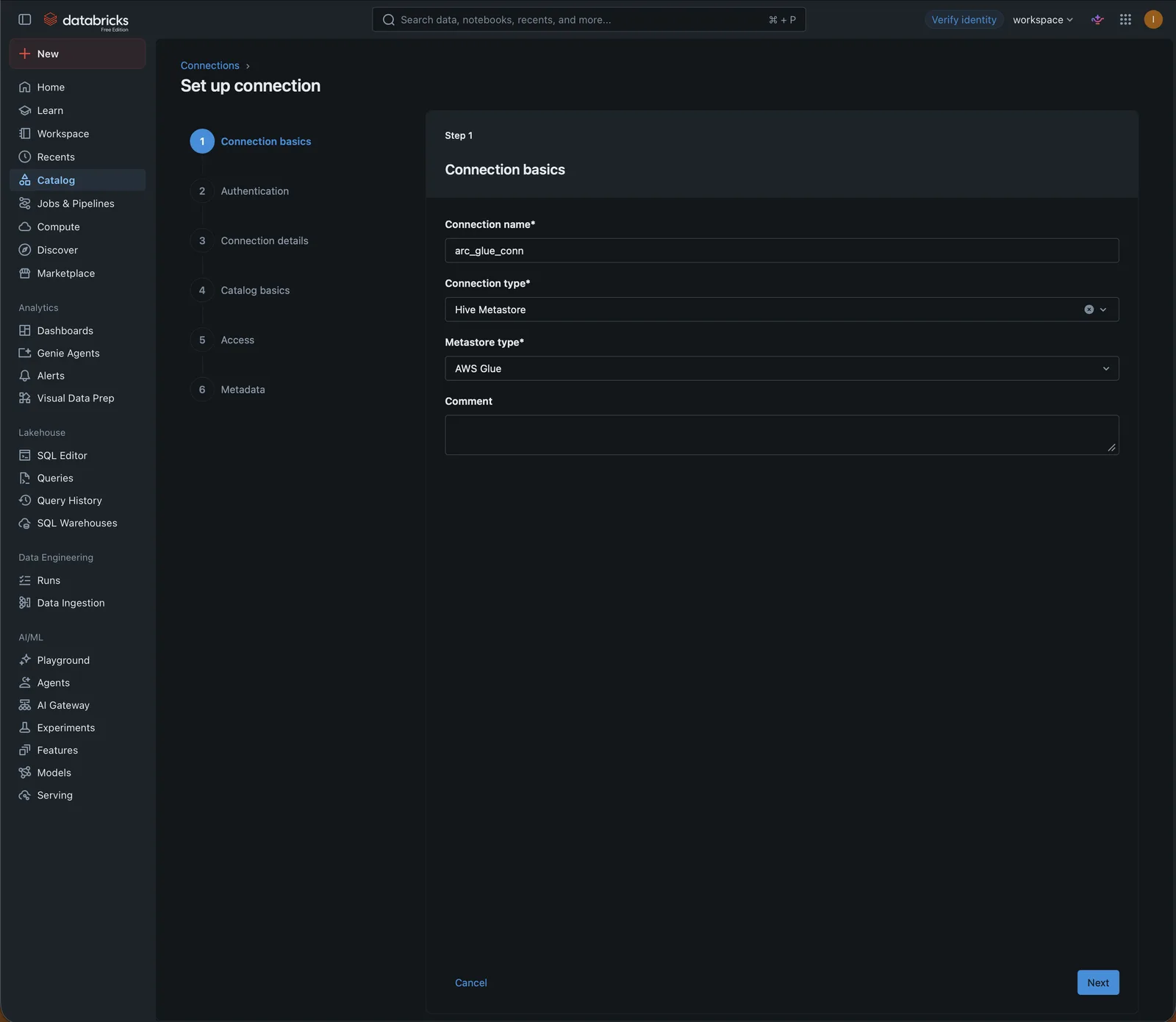
Open the Connections tab → Create connection. Glue is listed under Hive Metastore: choose Hive Metastore as the connection type and AWS Glue as the metastore type. Name it arc_glue_conn:
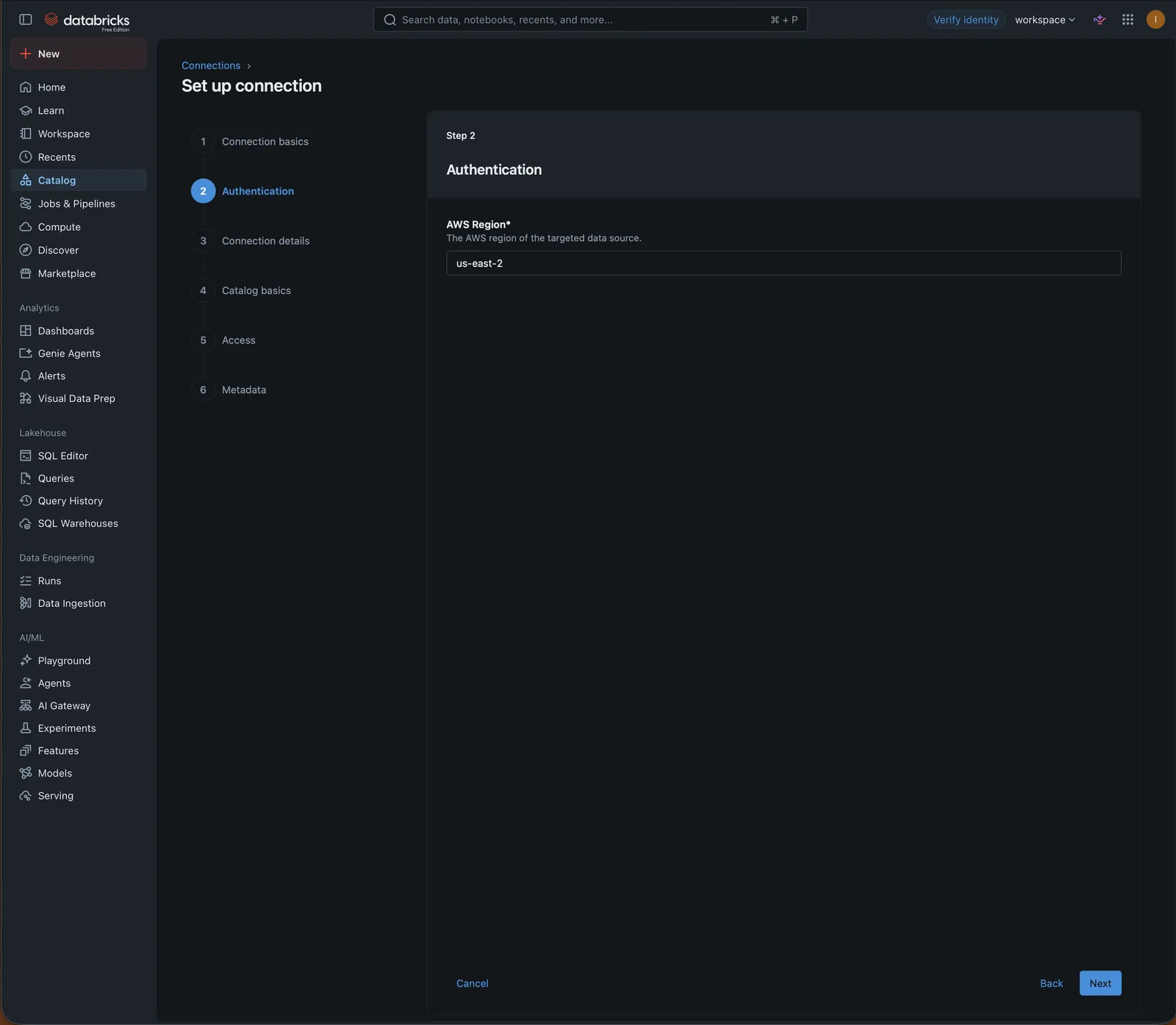
Enter the region of Arc's Glue catalog:
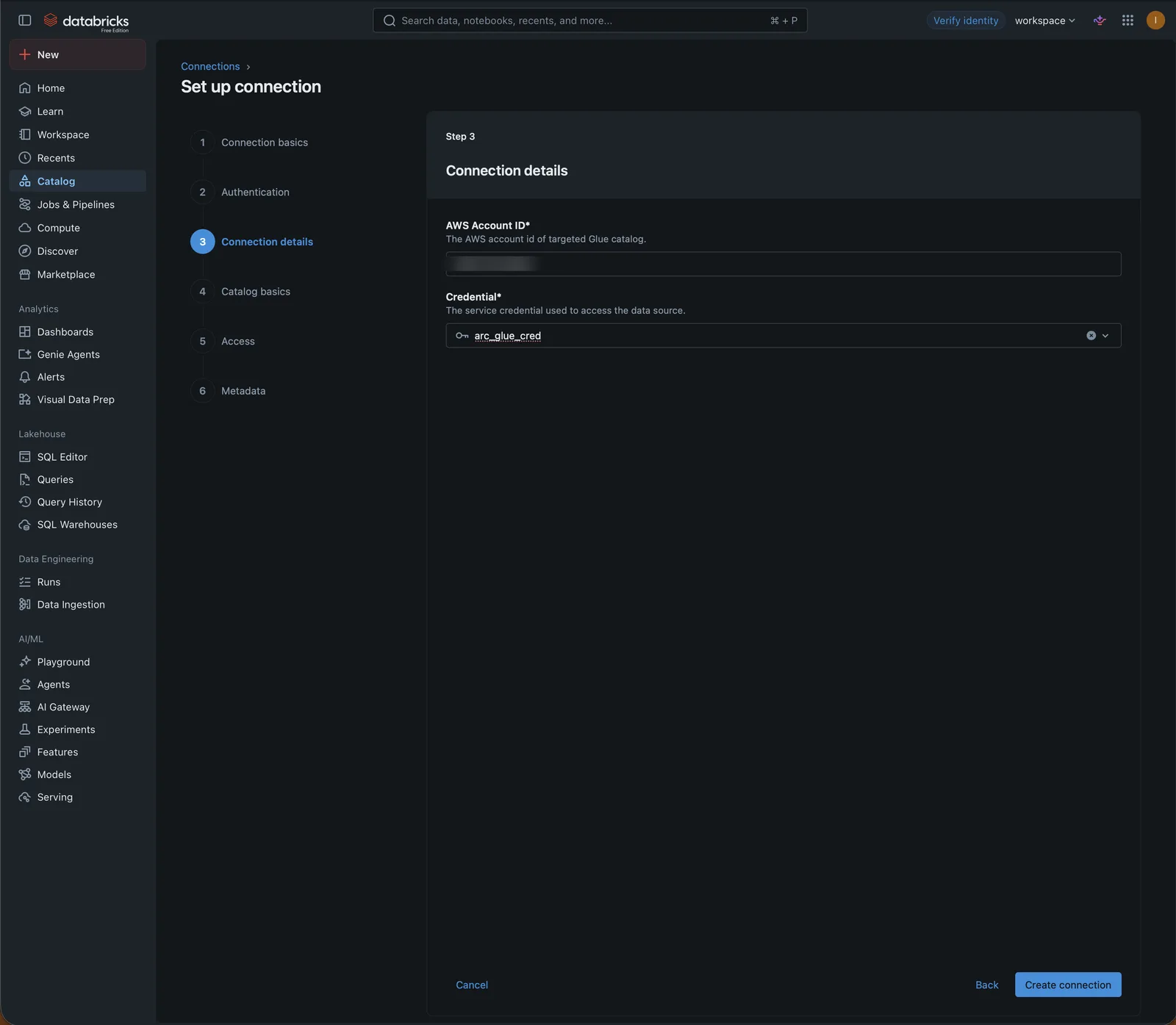
Then the AWS account that holds it and the service credential, and click Create connection:
The wizard goes on to create the foreign catalog. Name it arc_glue, and set the two paths:
- Authorized paths:
arc_loc, Arc's bucket. Only tables under these paths can be queried. - Storage location:
arc_scratch, the writable bucket.
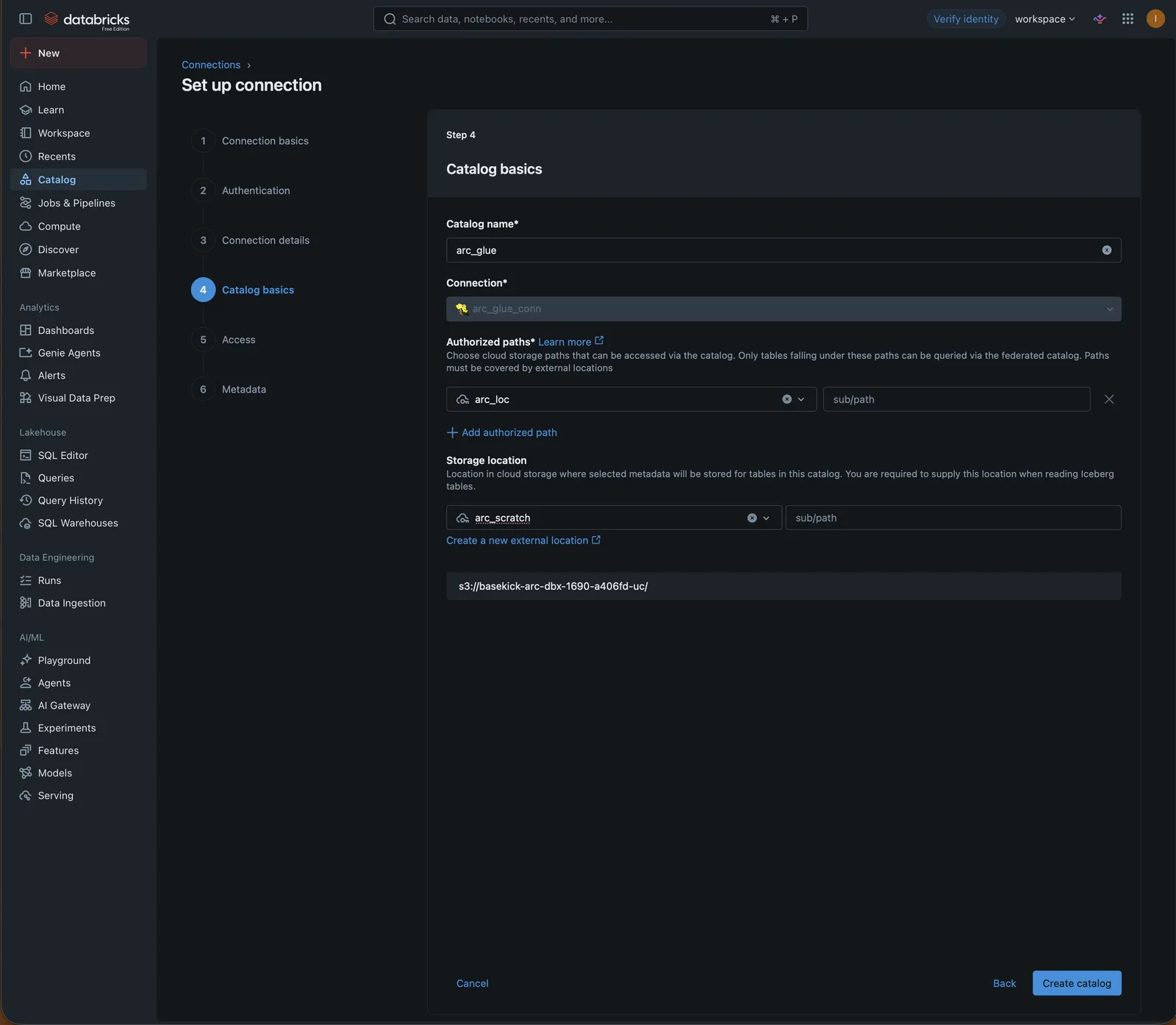
Set the storage location here
Without a storage location, every read fails with Failed to instantiate org.apache.hadoop.mapred.FileInputFormat. A read-only location is refused with PERMISSION_DENIED: The storage location for a foreign catalog … can not be read-only. On Free Edition, ALTER CATALOG … SET MANAGED LOCATION is not enabled, so a catalog created without it has to be dropped and created again.
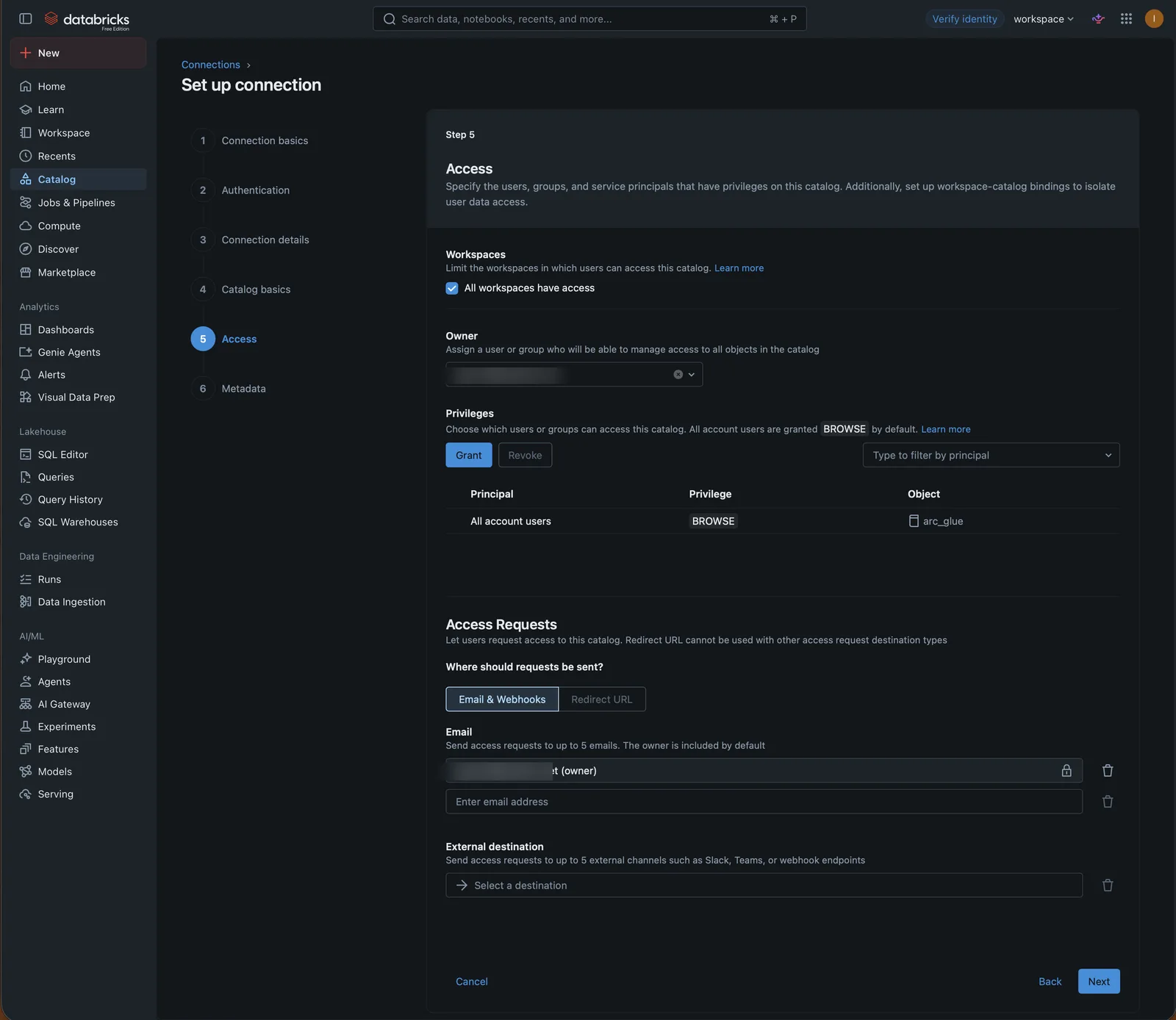
On Access, grant the catalog to the users or groups that should query it (all account users get BROWSE by default). Metadata (tags) is optional.
6. Browse the tables
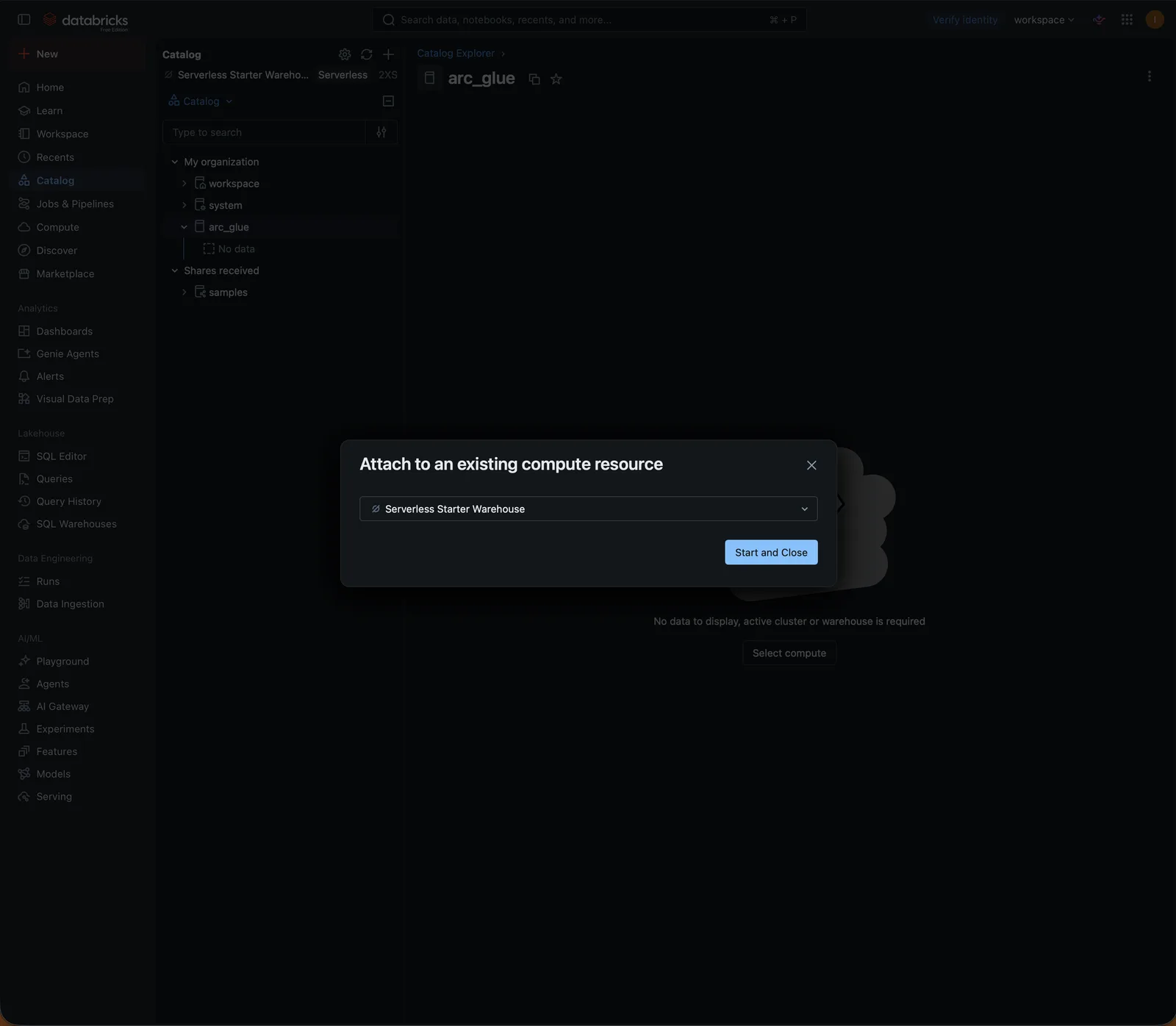
Open Catalog in the sidebar. The first time, Databricks asks for compute: pick the SQL warehouse (on Free Edition, Serverless Starter Warehouse) and Start and Close:
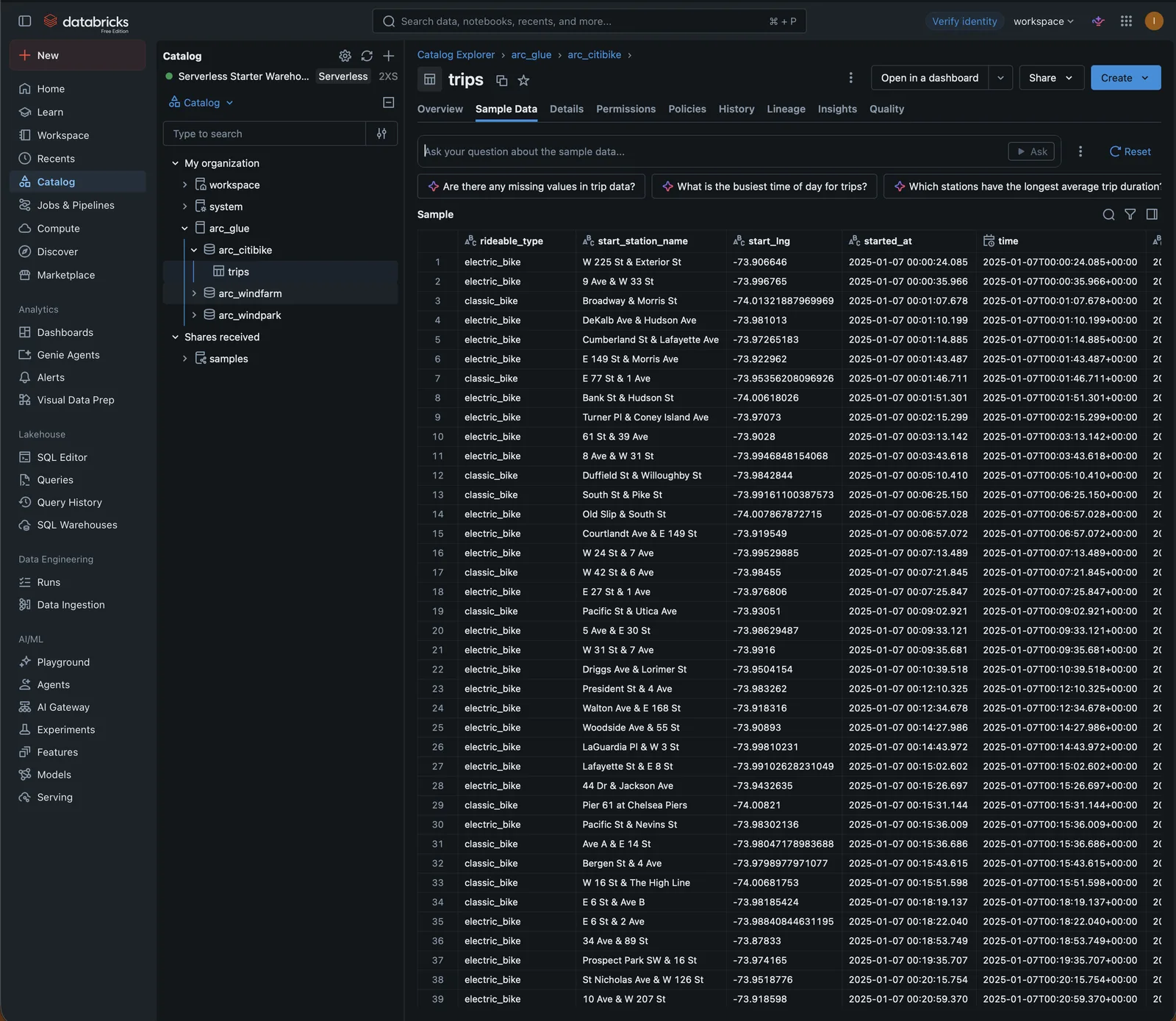
arc_glue lists one schema per Arc database (arc_citibike) and one table per measurement. Sample Data reads Arc's Parquet files straight from S3:
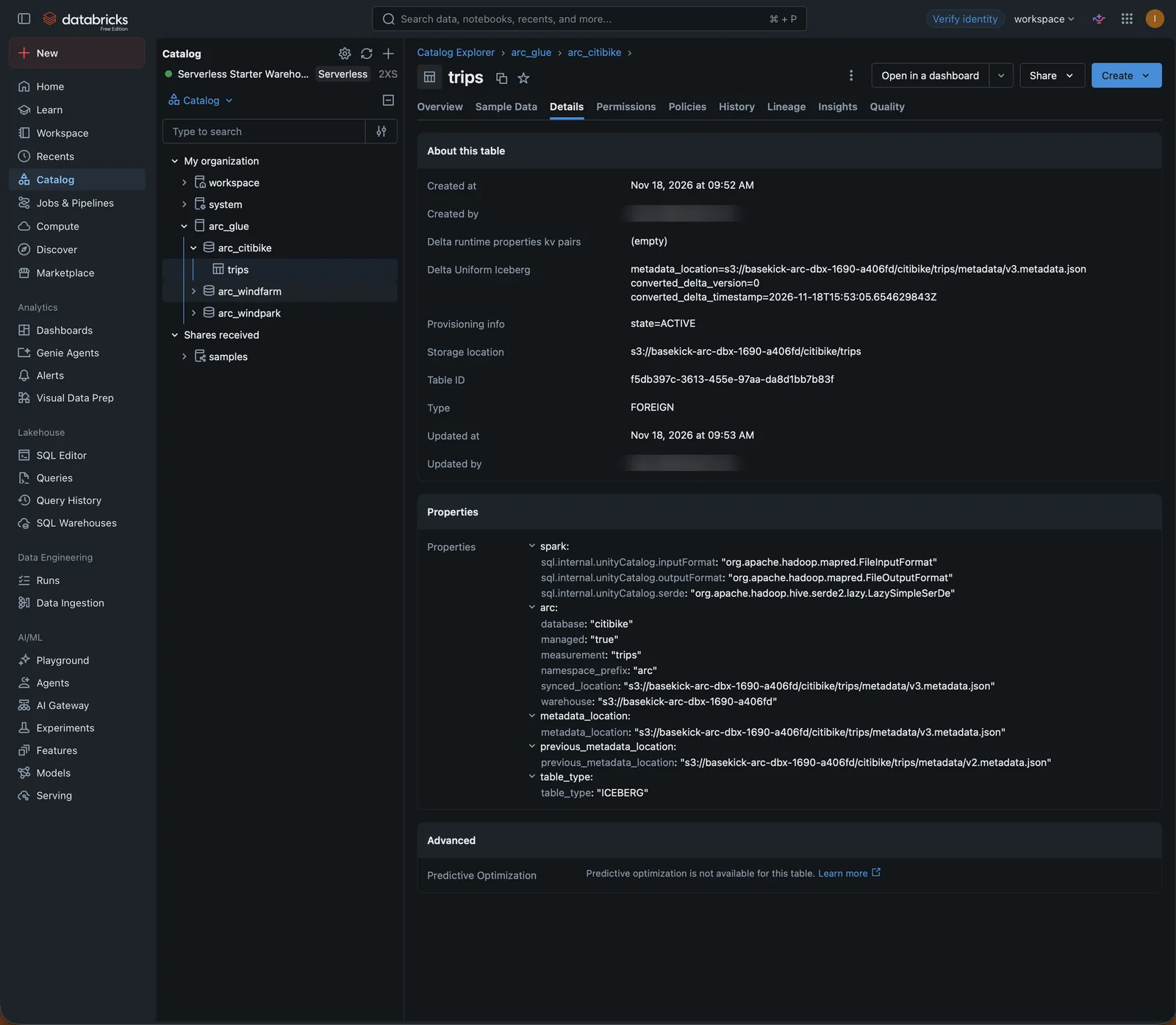
Details shows where the table lives: the storage location is Arc's measurement folder, metadata_location is the Iceberg version Arc last published, and the arc properties mark the table as one Arc manages. Databricks reads the Iceberg metadata and converts it to Delta metadata on its side; nothing is written to Arc's bucket.
7. Query in the SQL editor
Open SQL Editor and query the table by its three-part name:
SELECT member_casual, rideable_type, count(*) AS rides,
       round(percentile_approx((unix_millis(try_cast(ended_at AS timestamp)) - unix_millis(time)) / 60000.0, 0.5), 1) AS median_minutes
FROM arc_glue.arc_citibike.trips
GROUP BY ALL
ORDER BY rides DESC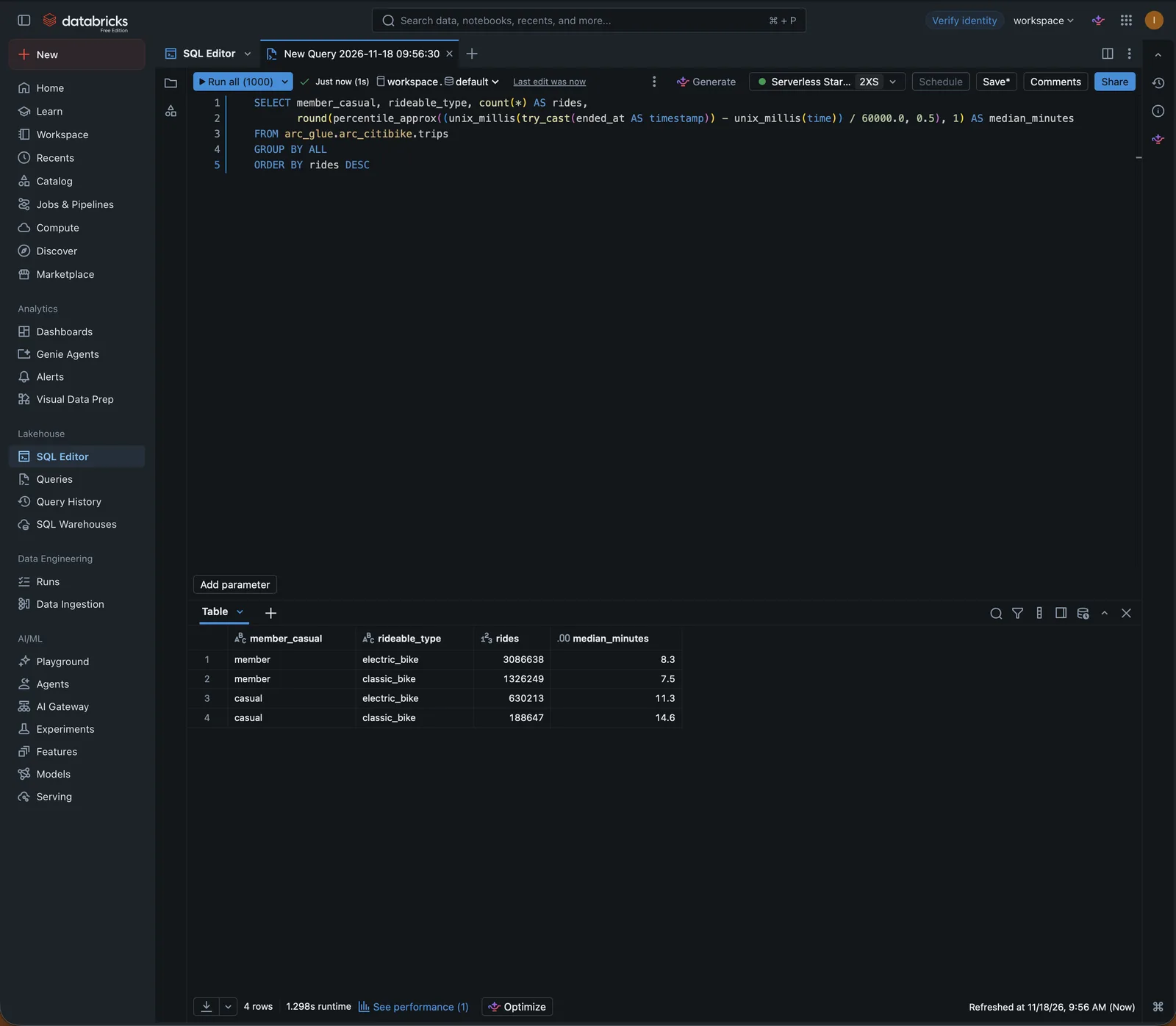
Columns keep the types Arc stored. Arc's time column is a timestamp; the Citi Bike CSVs were loaded with most fields as strings, so this query casts ended_at with try_cast.
8. Build a dashboard
New → Dashboard, then on the Data tab add each dataset with Add SQL dataset. For example, weekday rides by hour:
SELECT hour(time) AS hour, member_casual AS rider, count(*) AS rides
FROM arc_glue.arc_citibike.trips
WHERE dayofweek(time) BETWEEN 2 AND 6
GROUP BY ALL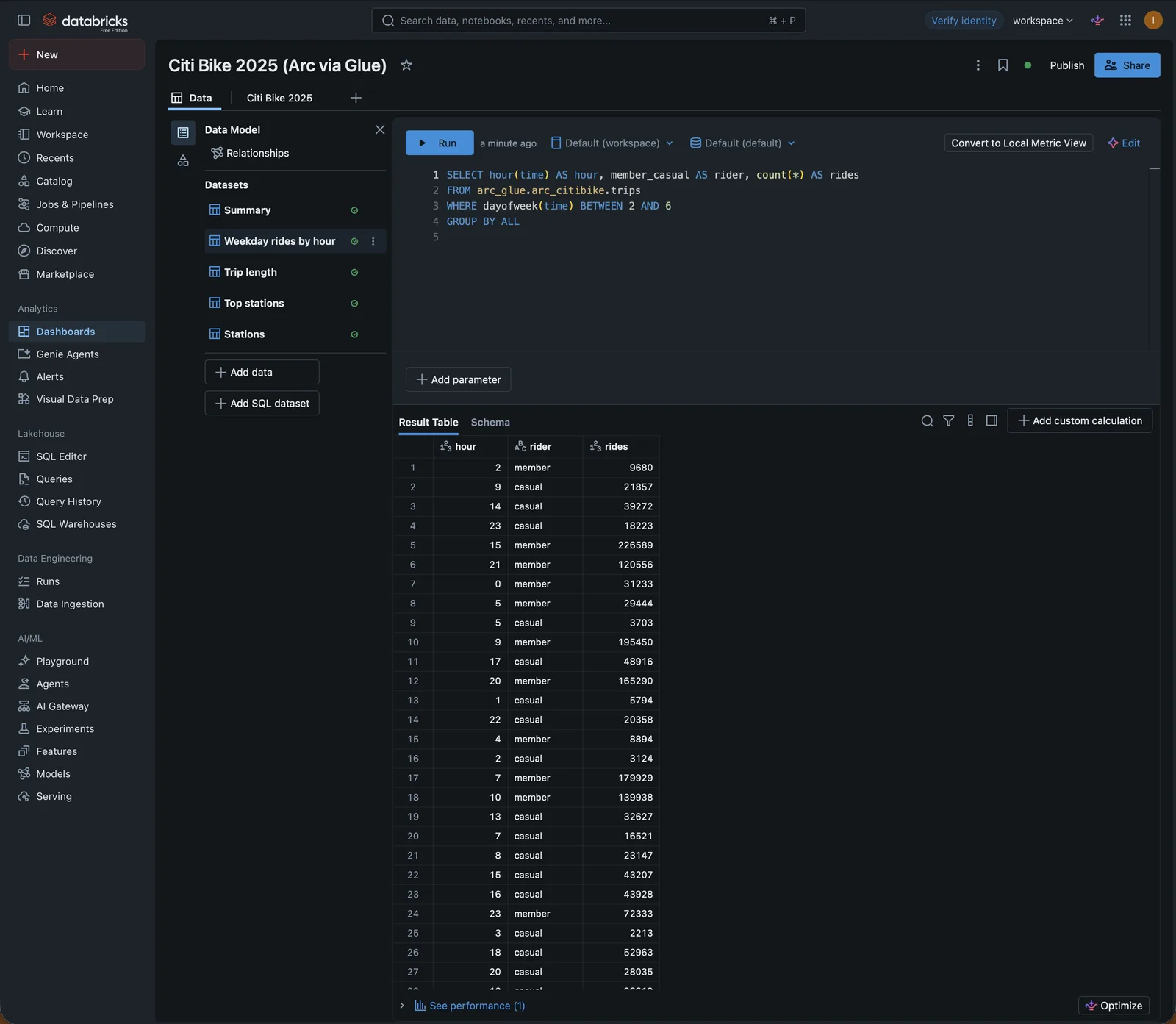
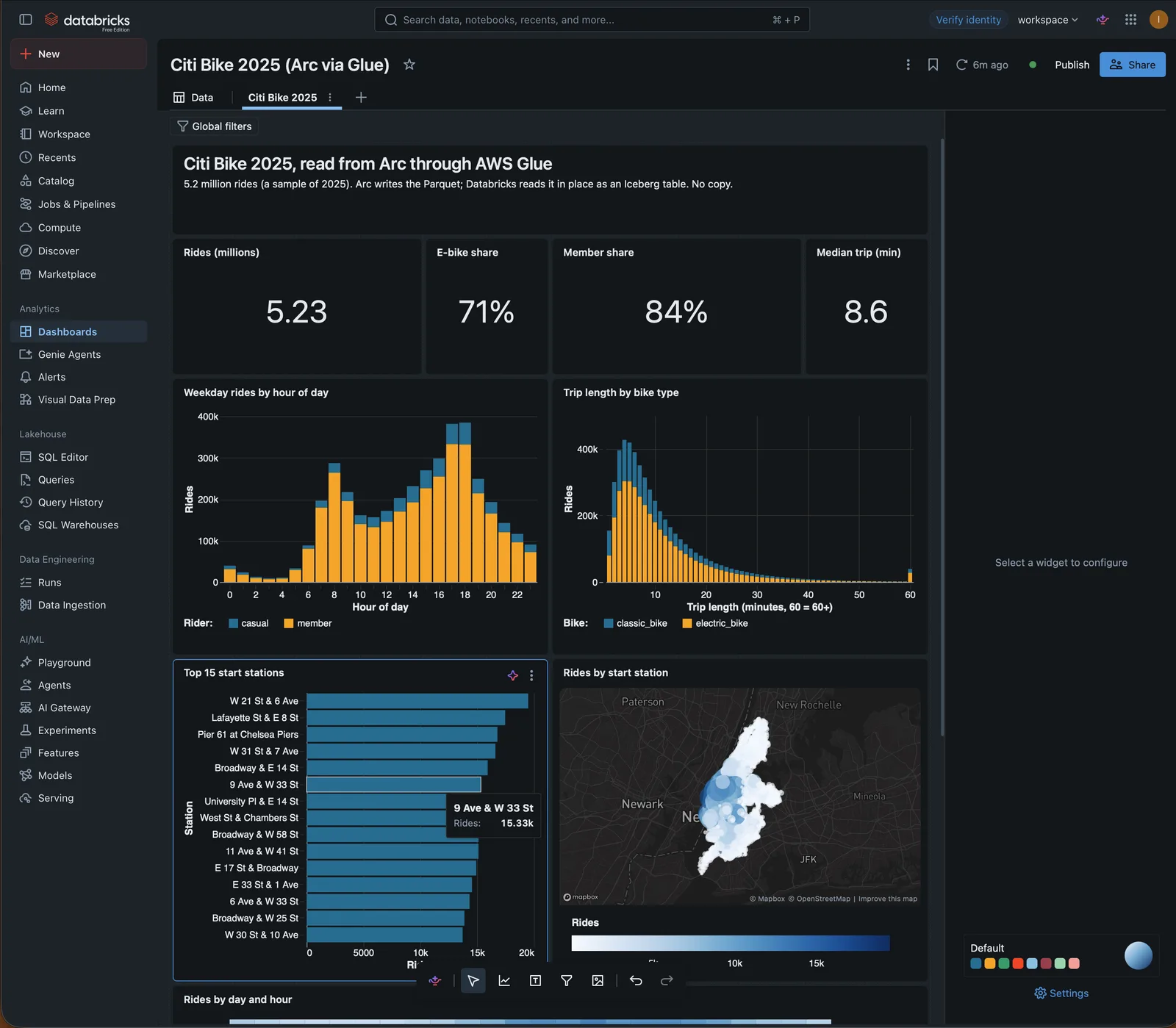
The other datasets in this dashboard:
-- Summary (the four counters)
SELECT round(count(*) / 1e6, 2) AS rides_m,
       avg(CASE WHEN rideable_type = 'electric_bike' THEN 1.0 ELSE 0 END) AS ebike_share,
       avg(CASE WHEN member_casual = 'member' THEN 1.0 ELSE 0 END) AS member_share,
       round(percentile_approx((unix_millis(try_cast(ended_at AS timestamp)) - unix_millis(time)) / 60000.0, 0.5), 1) AS median_minutes
FROM arc_glue.arc_citibike.trips;

-- Trip length, in minutes (60 = 60 or more)
SELECT least(floor((unix_millis(try_cast(ended_at AS timestamp)) - unix_millis(time)) / 60000), 60) AS minutes,
       rideable_type AS bike, count(*) AS rides
FROM arc_glue.arc_citibike.trips
GROUP BY ALL;

-- Top stations
SELECT start_station_name AS station, count(*) AS rides
FROM arc_glue.arc_citibike.trips
GROUP BY 1 ORDER BY 2 DESC LIMIT 15;

-- Stations on a map
SELECT start_station_name AS station,
       avg(try_cast(start_lat AS double)) AS lat,
       avg(try_cast(start_lng AS double)) AS lng,
       count(*) AS rides
FROM arc_glue.arc_citibike.trips
GROUP BY 1;

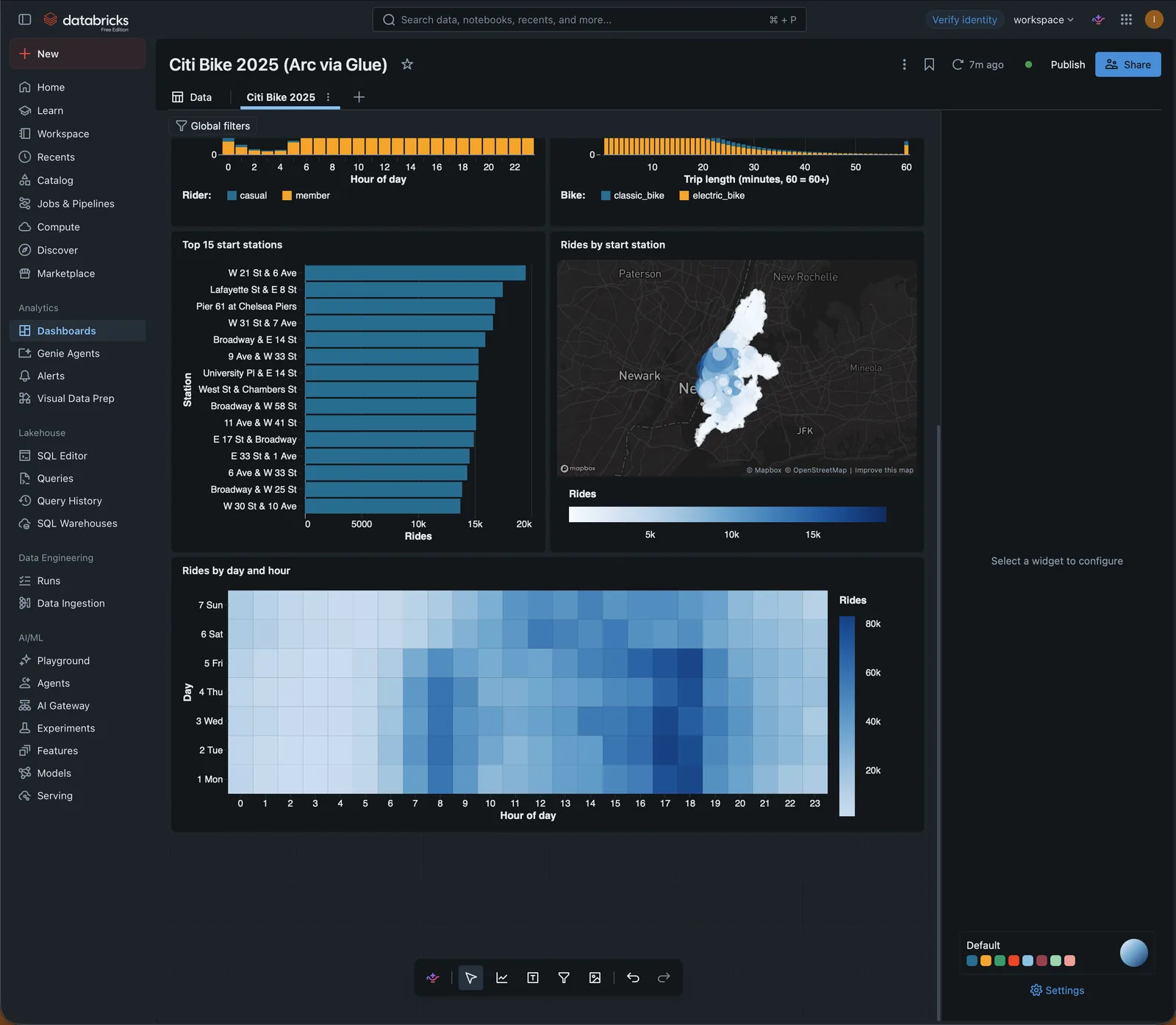
-- Rides by day and hour
SELECT concat(((dayofweek(time) + 5) % 7) + 1, ' ', date_format(time, 'E')) AS day,
       hour(time) AS hour, count(*) AS rides
FROM arc_glue.arc_citibike.trips
GROUP BY ALL;
On the canvas, add a visualization per dataset (bar, map, heatmap, counters):
Keeping it current
There is nothing to schedule in Databricks. Arc publishes a new table version on each export pass that finds changed files (iceberg.reconcile_interval, 300 seconds by default), Glue points at it within seconds, and the next Databricks query reads it.
In a test with reconcile_interval = 30, a write reached Databricks 26 seconds after Arc accepted it: 22 seconds waiting for the export pass, then the first query after the Glue update returned the new rows. With the default interval, expect up to about five minutes.
Set up with SQL
The same objects, for scripts. Credentials and external locations are created with the Databricks CLI or API (databricks credentials create-credential, databricks storage-credentials create, databricks external-locations create), then:
CREATE CONNECTION arc_glue_conn TYPE glue
  OPTIONS (aws_region 'us-east-2', aws_account_id '123456789012', credential 'arc_glue_cred');

CREATE FOREIGN CATALOG arc_glue USING CONNECTION arc_glue_conn
  OPTIONS (authorized_paths 's3://my-arc-bucket/', storage_root 's3://my-databricks-scratch/');
Troubleshooting
| Error | Cause | Fix |
|---|---|---|
Failed to instantiate org.apache.hadoop.mapred.FileInputFormat | The foreign catalog has no storage location. | Recreate the catalog with a storage location. |
PERMISSION_DENIED: The storage location for a foreign catalog … can not be read-only | The storage location is a read-only external location. | Use a writable one on a separate bucket. |
AccessDeniedException reading a .parquet file | The table was created with the warehouse layout, so the data is outside the table's location. | Set iceberg.layout = "colocated" and recreate the table. |
DELTA_SHALLOW_CLONE_FILE_NOT_FOUND on a table that was dropped and recreated in Arc | Databricks still holds the old table's state. REFRESH TABLE does not clear it. | Drop and recreate the foreign catalog. That changes nothing in Glue or S3. |
DELTA_UNIFORM_INGRESS_VIOLATION … column names that only differ by case | The measurement has two columns whose names differ only by case (Birth Year and birth year). | Keep each historical schema in its own measurement, or normalise the names before writing. |
Limits
- Read only. Databricks reads Arc's tables; write to Arc, not to the table.
- Never run orphan-file cleanup or
VACUUMon these tables. The table's folder is Arc's data folder. - Cold tier. On Arc Enterprise with tiered storage, files that move to the cold tier leave the table's folder, and Databricks can't read them. Query hot data.
- One schema per measurement. A column whose type differs between files stops the export of that table; Arc logs the column and both types.
See Apache Iceberg export for everything Arc does in Glue: ownership, deletion of dropped tables, and prefixes for several deployments.
BigQuery
Query Arc's data in BigQuery without copying it: Arc registers its Iceberg tables in AWS Glue, and a BigQuery Glue federated dataset reads them through BigQuery Omni, next to the data in AWS. Step by step, from the IAM role to a query and a chart in BigQuery Studio.
Snowflake
Query Arc's data in Snowflake without copying it: Snowflake reads Arc's Iceberg tables through Arc's own REST catalog or through AWS Glue, and its Parquet files through a read-only external volume. Step by step in Snowsight, from the IAM role to a Streamlit map.