
Amazon Athena and Redshift
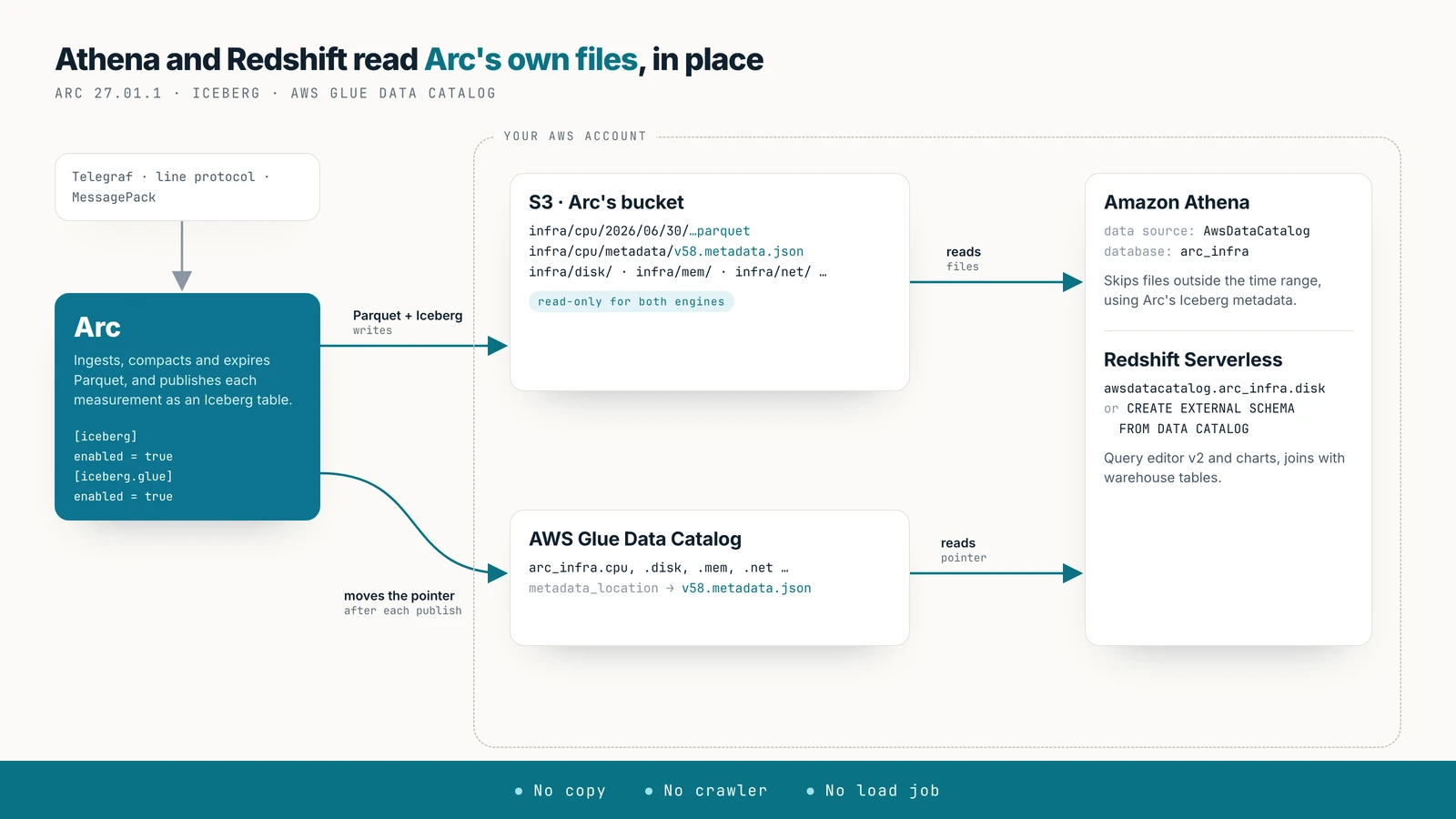
Query Arc's data with Amazon Athena and Redshift Serverless without copying it: Arc registers each measurement's Iceberg table in the AWS Glue Data Catalog, and both engines read Arc's Parquet in place. No crawler, no COPY, no load job.
Query Arc's data with Amazon Athena and Amazon Redshift where it already is. Arc publishes each measurement as an Apache Iceberg table over its own Parquet files and registers it in the AWS Glue Data Catalog. Athena reads Glue directly, and Redshift Serverless mounts it automatically, so both read Arc's files in your bucket. There is no crawler to run, no COPY and no load job.
Availability
Arc 27.01.1 or later, with an S3 primary on AWS (storage.backend = "s3"). Every step below was run in us-east-2 with a year of real server metrics: CPU, memory, disk, disk I/O, network, system load, processes and swap from three Linux hosts, one reading a minute.
Before you start
- Arc 27.01.1 on S3 in AWS, in the region where you'll query.
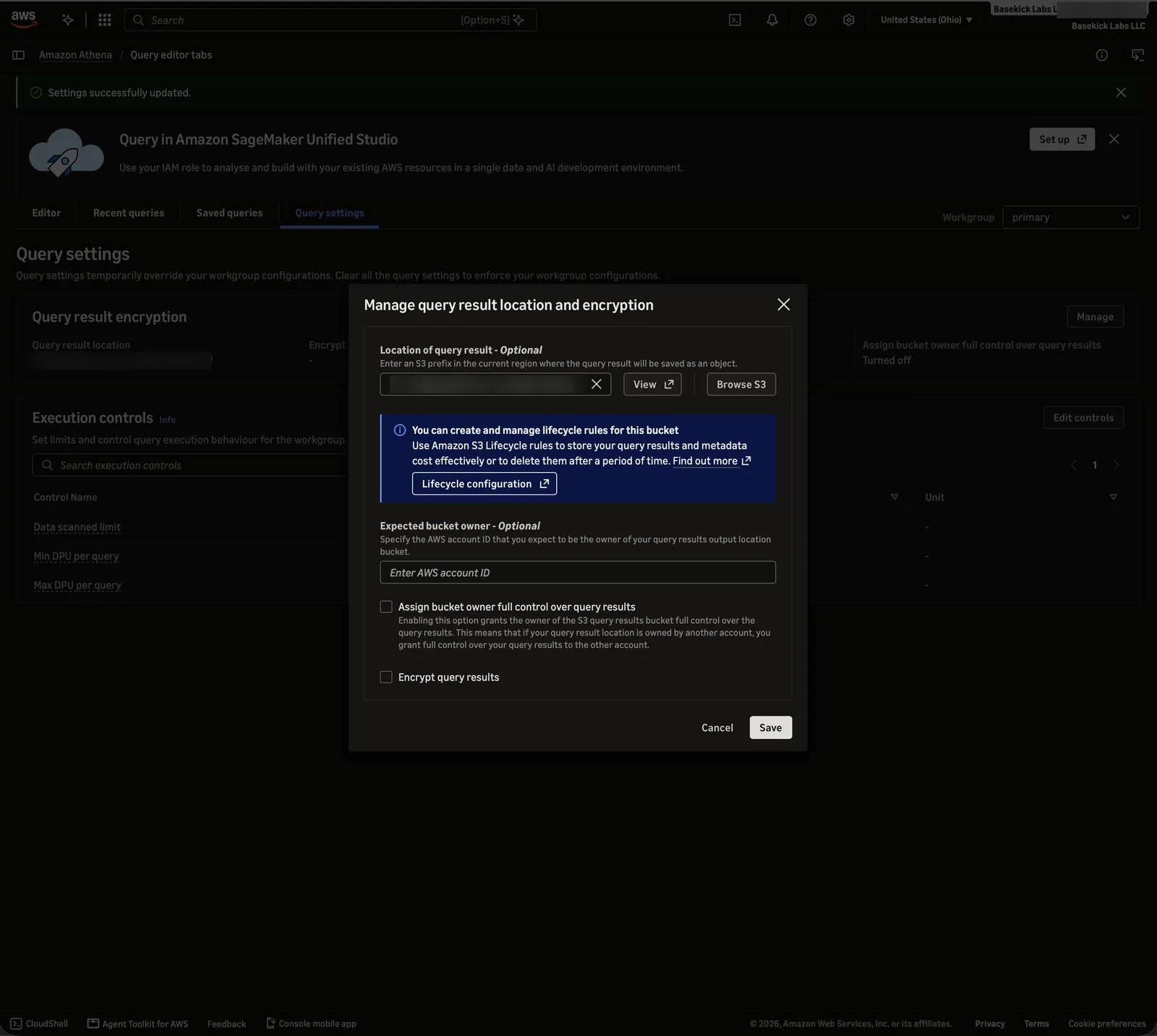
- An S3 bucket for Athena's query results, separate from Arc's. Athena writes a file for every query; in Arc's bucket those files would show up as data.
- For Redshift: an IAM user or role to sign in with. Redshift query editor v2 doesn't work for the root user.
1. Configure Arc
Turn on the Iceberg export and the Glue registration:
[iceberg]
enabled = true

[iceberg.glue]
enabled = true
# region = "us-east-2"          # default: storage.s3_region
# catalog_id = "123456789012"   # default: the credentials' account
Or with environment variables: ARC_ICEBERG_ENABLED=true, ARC_ICEBERG_GLUE_ENABLED=true. Athena has also read the default warehouse table layout in our tests; this guide used colocated.
The credentials Arc uses for S3 also call Glue. They need glue:GetDatabase, GetDatabases, CreateDatabase, GetTable, GetTables, CreateTable, UpdateTable and DeleteTable on the arc_* databases.
After the next export pass (every 5 minutes by default), each Arc database is a Glue database arc_<database>, with one table per measurement. The examples use the database infra, so the Glue database is arc_infra.
Read-only for the engines
Give Athena and Redshift read-only access to Arc's bucket. Glue accepts writes, and a DROP TABLE … PURGE, a VACUUM or an orphan-file cleanup run through it deletes the data files the table names, which are Arc's own files.
2. Athena
Open Athena → Query editor in the region of Arc's bucket. The first time, Athena asks where to put query results: Settings → Manage, enter the results bucket, and Save:
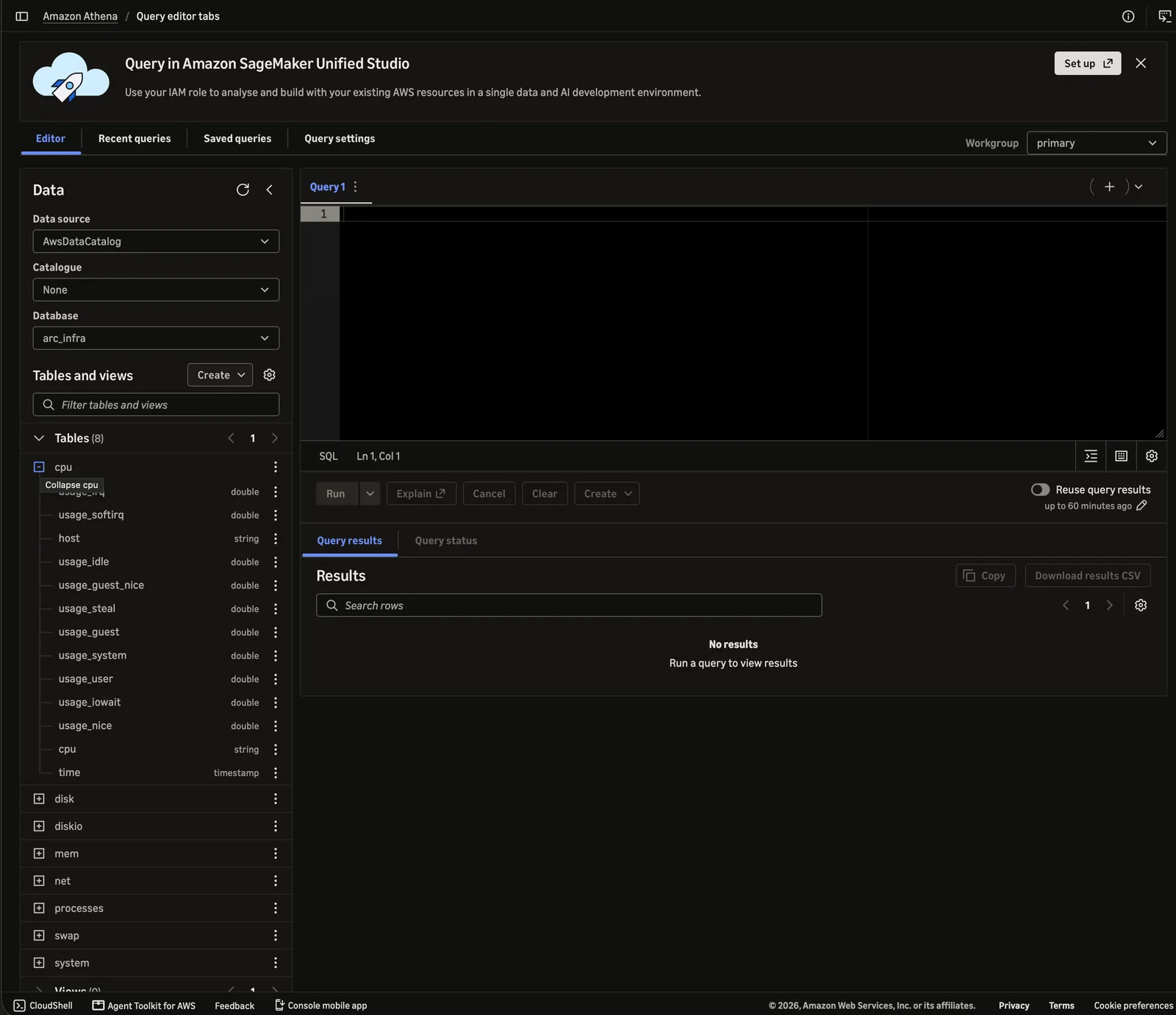
In the Editor, choose the data source AwsDataCatalog and the database arc_infra. Arc's measurements are the tables, with Arc's column names and types:
Query them with Athena's SQL. For example, the worst moments of one host, by system load:
SELECT time, round(load1, 1) AS load1, n_cpus
FROM system
WHERE host = 'prod-2'
ORDER BY load1 DESC
LIMIT 5;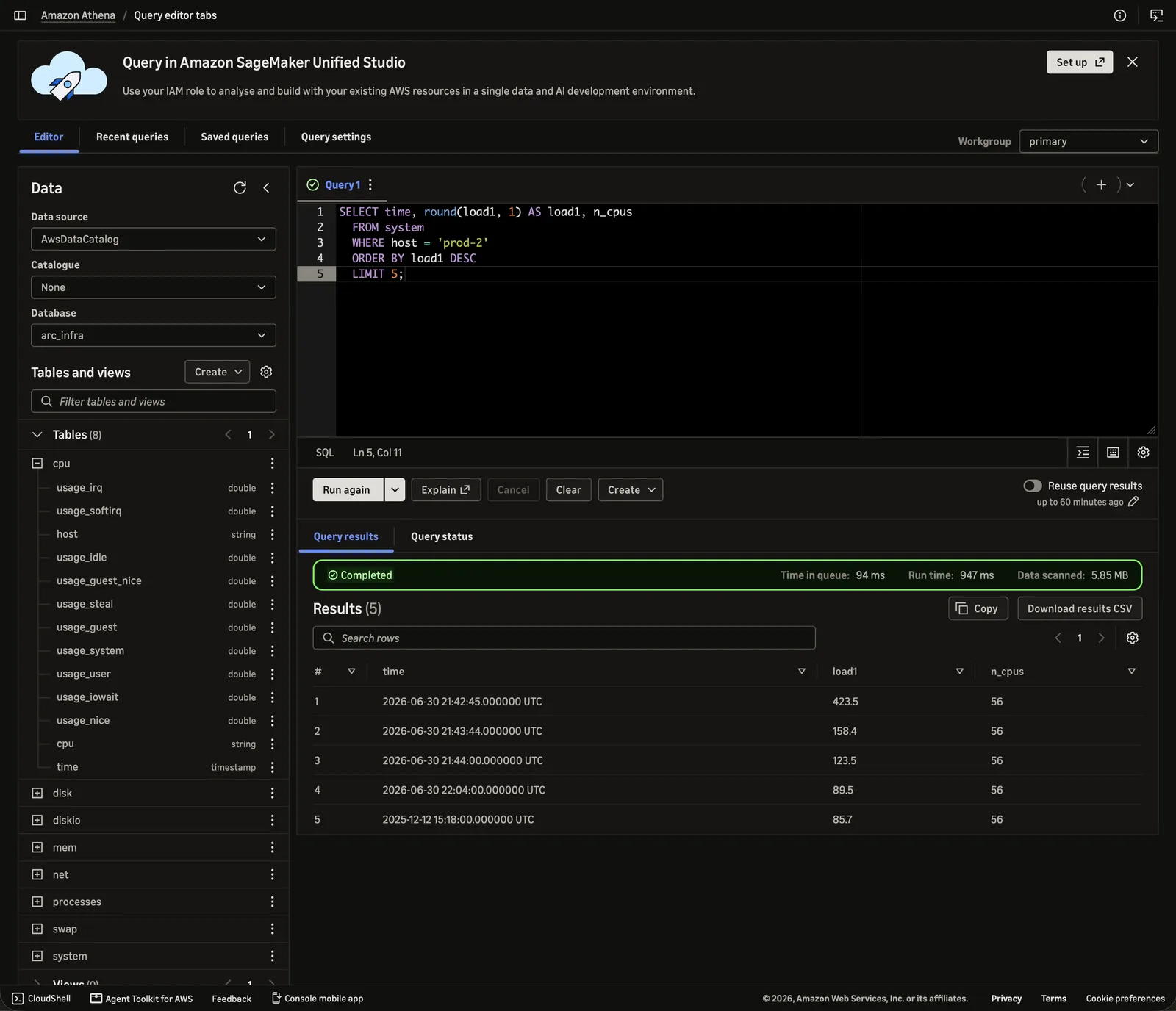
Then what happened around it, hour by hour, joining two of Arc's measurements:
SELECT date_trunc('hour', s.time) AS hour,
       round(max(s.load1), 1)        AS load1,
       round(max(m.used_percent), 1) AS mem_pct
FROM system s
JOIN mem m ON m.host = s.host AND m.time = s.time
WHERE s.host = 'prod-2'
  AND s.time BETWEEN TIMESTAMP '2026-06-30 18:00:00 UTC' AND TIMESTAMP '2026-07-01 01:00:00 UTC'
GROUP BY 1
ORDER BY 1;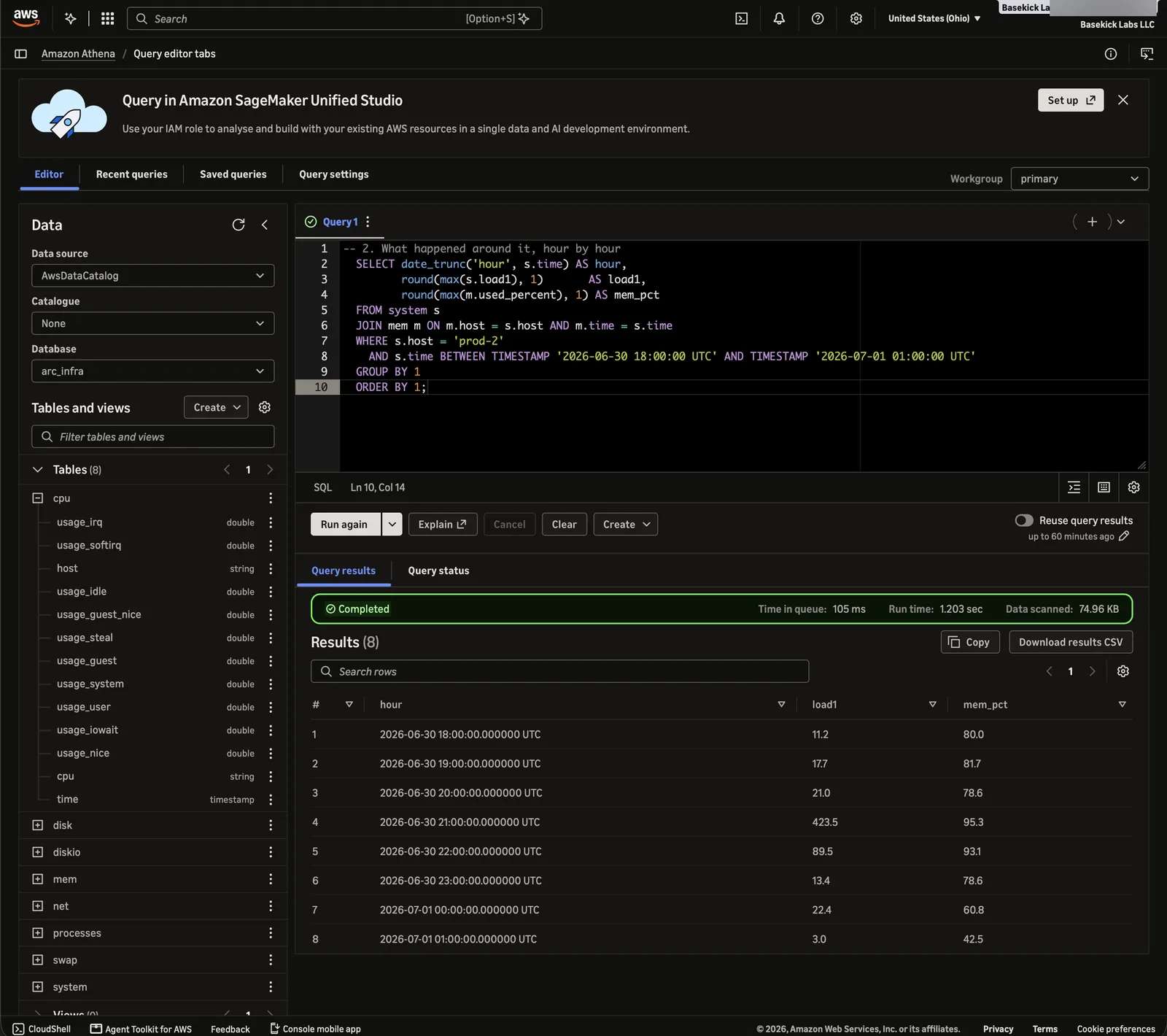
The year-long query scanned 5.85 MB; the one limited to seven hours scanned 75 KB. Athena reads the time range of each file from Arc's Iceberg metadata and skips every file outside the filter, so filter on time whenever you can.
3. Redshift Serverless
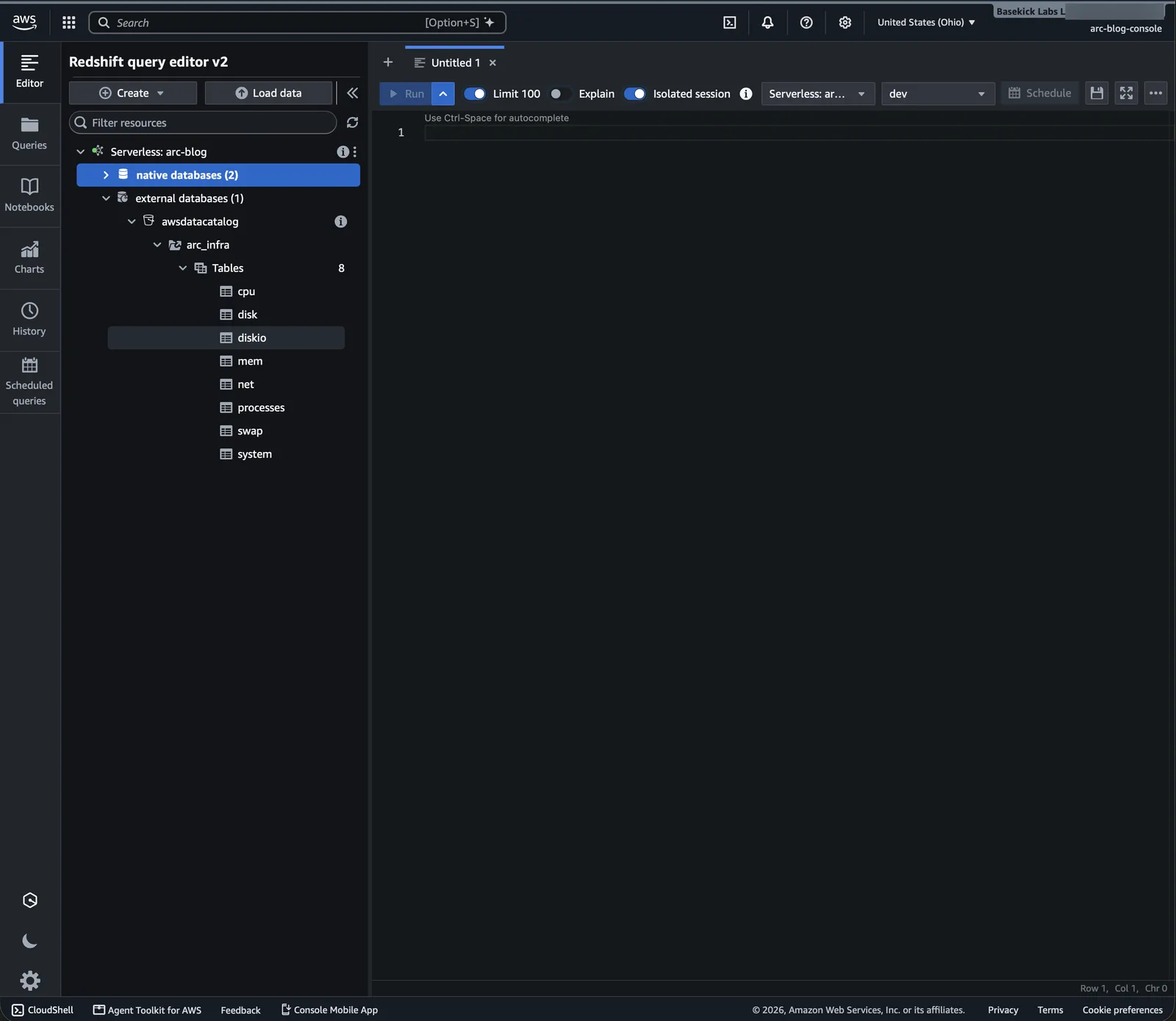
Redshift Serverless mounts the Glue Data Catalog automatically as the external database awsdatacatalog, so Arc's tables are queryable without creating anything. Open the workgroup's Query data, which opens query editor v2.
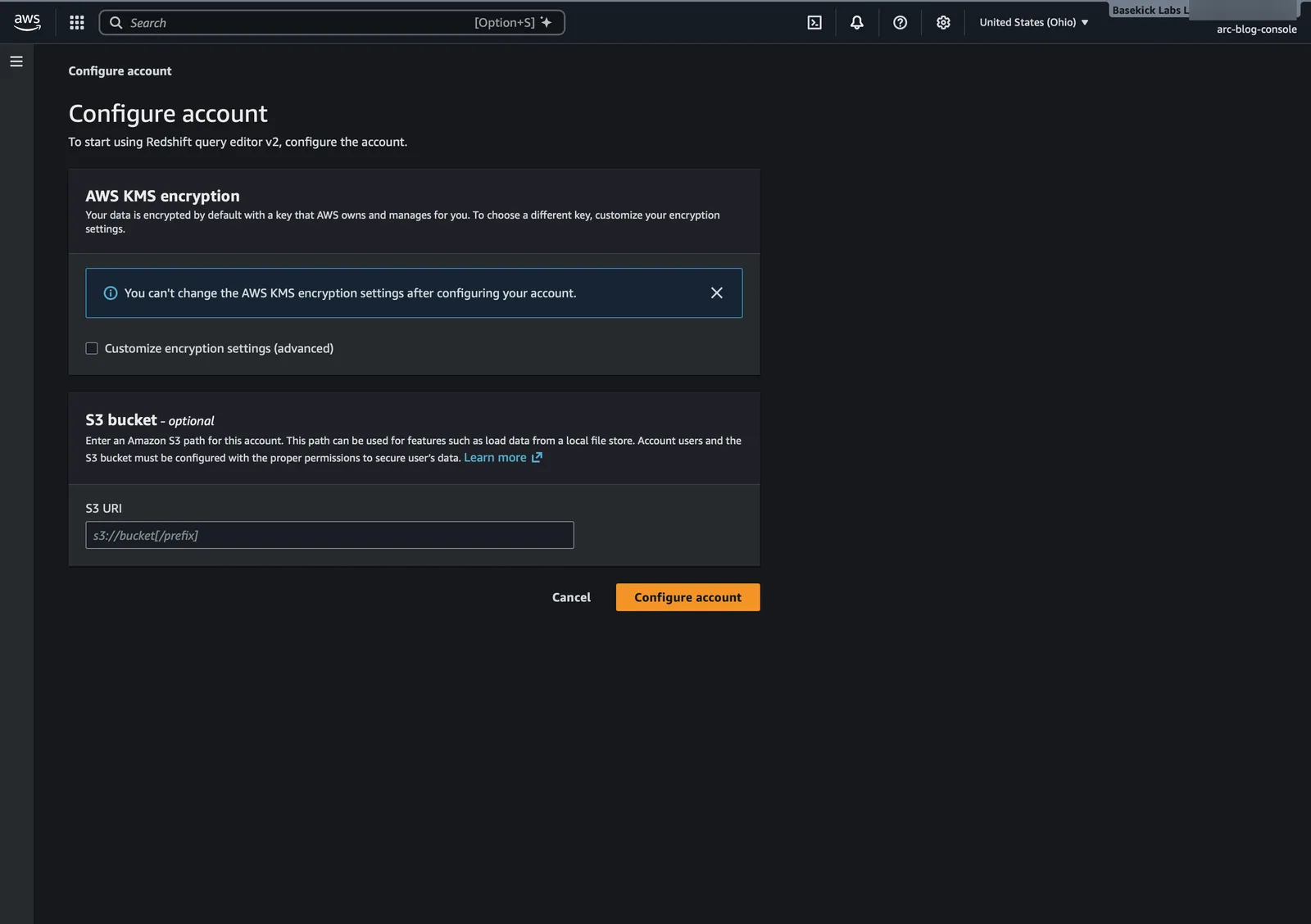
The first time query editor v2 is used in an account, it asks to configure the account. Keep the default encryption and leave the S3 bucket empty:
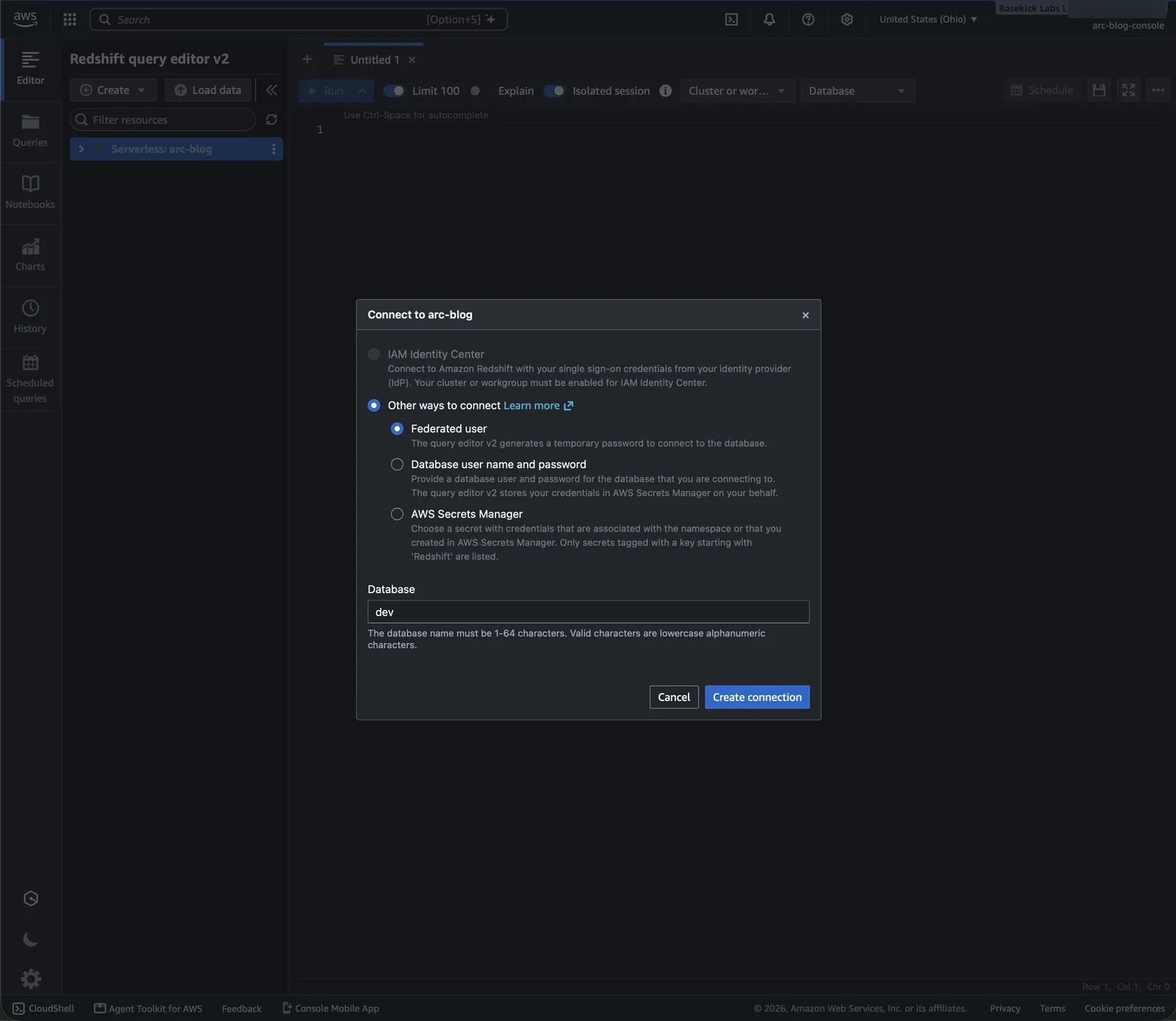
Connect to the workgroup as a Federated user with your IAM identity, database dev:
Arc's Glue database appears under external databases → awsdatacatalog:
A federated database user can't use that database until an admin grants it, once per user. Run this as an admin (or a superuser), with the name of your IAM user or role:
GRANT USAGE ON DATABASE awsdatacatalog TO "IAM:<iam-user-name>";Without it, queries fail with permission denied for database awsdatacatalog. Per AWS, queries on the mounted catalog run with your IAM identity's own permissions, so it needs read access to the arc_* databases in Glue and to Arc's bucket.
Then query with three-part names, and write time in double quotes:
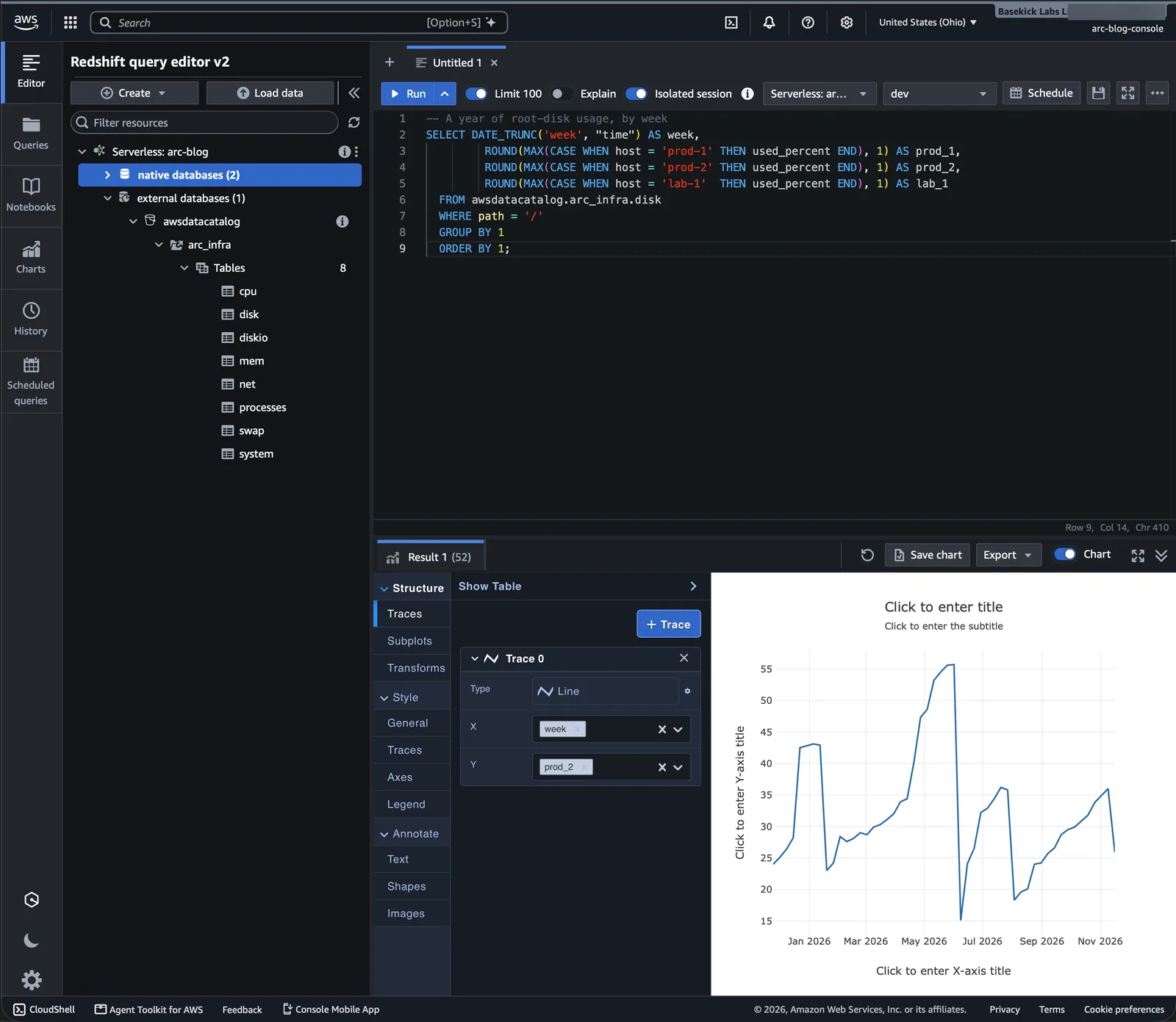
SELECT DATE_TRUNC('week', "time") AS week,
       ROUND(MAX(CASE WHEN host = 'prod-1' THEN used_percent END), 1) AS prod_1,
       ROUND(MAX(CASE WHEN host = 'prod-2' THEN used_percent END), 1) AS prod_2,
       ROUND(MAX(CASE WHEN host = 'lab-1'  THEN used_percent END), 1) AS lab_1
FROM awsdatacatalog.arc_infra.disk
WHERE path = '/'
GROUP BY 1
ORDER BY 1;
Turn off Limit 100 to see the whole year. The result's Chart tab plots it; query editor v2 charts one column per trace, which is why the query puts each host in a column:
A schema instead of the mounted catalog
To use short names, or on a provisioned cluster, map the Glue database to an external schema with an IAM role that can read Glue and Arc's bucket (Redshift Spectrum):
CREATE EXTERNAL SCHEMA arc_infra
FROM DATA CATALOG DATABASE 'arc_infra'
IAM_ROLE default;   -- or 'arn:aws:iam::123456789012:role/<role>'

SELECT host, COUNT(*) FROM arc_infra.cpu GROUP BY host;
The role's policy:
{
  "Version": "2012-10-17",
  "Statement": [
    { "Effect": "Allow",
      "Action": ["glue:GetDatabase", "glue:GetDatabases", "glue:GetTable", "glue:GetTables",
                 "glue:GetPartition", "glue:GetPartitions", "glue:BatchGetPartition"],
      "Resource": [
        "arn:aws:glue:us-east-2:123456789012:catalog",
        "arn:aws:glue:us-east-2:123456789012:database/arc_*",
        "arn:aws:glue:us-east-2:123456789012:table/arc_*/*"
      ] },
    { "Effect": "Allow",
      "Action": ["s3:ListBucket", "s3:GetBucketLocation"],
      "Resource": "arn:aws:s3:::my-arc-bucket" },
    { "Effect": "Allow",
      "Action": "s3:GetObject",
      "Resource": "arn:aws:s3:::my-arc-bucket/*" }
  ]
}
Its trust policy lets redshift.amazonaws.com and redshift-serverless.amazonaws.com assume it. Make it the namespace's default role to use IAM_ROLE default.
Keeping it current
There is nothing to refresh in either engine. Arc publishes a new table version on each export pass that finds changed files (iceberg.reconcile_interval, 300 seconds by default), moves the Glue pointer within seconds, and the next Athena or Redshift query reads the new version. New measurements appear as new tables.
Troubleshooting
| Error | Cause | Fix |
|---|---|---|
Query editor v2: You must have an account to use Redshift Query Editor V2 | Signed in as the root user, or the account isn't configured yet. | Sign in as an IAM user or role, and configure the account the first time. |
schema "arc_infra" does not exist | The query uses a two-part name without an external schema. | Use awsdatacatalog.arc_infra.<table>, or create the external schema. |
permission denied for database awsdatacatalog | The federated database user has no grant on the mounted catalog. | GRANT USAGE ON DATABASE awsdatacatalog TO "IAM:<name>"; |
Limits
- Read only. Write to Arc; never run
VACUUM, orphan-file cleanup orDROP TABLE … PURGEon these tables. - Cold tier. On Arc Enterprise with tiered storage, files that move to a cold tier leave the bucket, and neither engine can read them. Query hot data.
- One schema per measurement. A column whose type differs between files stops the export of that table; Arc logs the column and both types.
See Apache Iceberg export for everything Arc does in Glue: ownership, deletion of dropped tables, and prefixes for several deployments.
Apache Iceberg Export
Publish Arc measurements as Apache Iceberg tables so Spark, Trino, DuckDB, and PyIceberg can read them directly, configured through the iceberg section of arc.toml.
BigQuery
Query Arc's data in BigQuery without copying it: Arc registers its Iceberg tables in AWS Glue, and a BigQuery Glue federated dataset reads them through BigQuery Omni, next to the data in AWS. Step by step, from the IAM role to a query and a chart in BigQuery Studio.