Clustering & High Availability
Scale Arc horizontally with multi-node clusters. Separate write, read, and compaction workloads across dedicated nodes with automatic failover and shared storage.
Overview
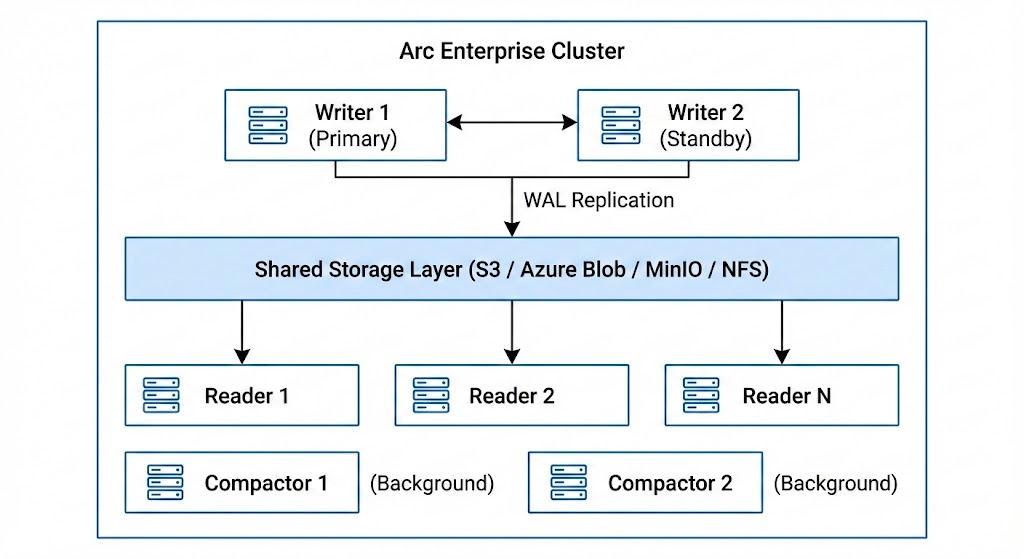
Arc Enterprise clustering uses a role-based architecture where each node in the cluster serves a specific purpose:
Node Roles
| Role | Purpose | Capabilities |
|---|---|---|
| writer | Handles data ingestion and WAL | Ingest, coordinate |
| reader | Serves queries from shared storage | Query |
| compactor | Runs background file optimization | Compact |
| standalone | Single-node mode (default) | All capabilities |
- Writers receive data via the ingestion API, buffer it, and flush Parquet files to shared storage. WAL replication ensures durability.
- Readers query data directly from shared storage using DuckDB. Scale readers horizontally to handle more concurrent queries.
- Compactors run hourly and daily file compaction in the background without impacting write or read performance.
Configuration
TOML Configuration
[cluster]
enabled = true
node_id = "writer-01"           # Unique identifier for this node
role = "writer"                 # writer, reader, compactor, standalone
cluster_name = "production"     # Cluster identifier
seeds = ["10.0.1.10:9000", "10.0.1.11:9000"]  # Seed nodes for discovery
coordinator_addr = ":9000"      # Address for inter-node communication
health_check_interval = 10      # Health check interval (seconds)
heartbeat_interval = 5          # Heartbeat interval (seconds)
replication_enabled = true      # Enable WAL replication to readers
Environment Variables
ARC_CLUSTER_ENABLED=true
ARC_CLUSTER_NODE_ID=writer-01
ARC_CLUSTER_ROLE=writer
ARC_CLUSTER_CLUSTER_NAME=production
ARC_CLUSTER_SEEDS=10.0.1.10:9000,10.0.1.11:9000
ARC_CLUSTER_COORDINATOR_ADDR=:9000
ARC_CLUSTER_HEALTH_CHECK_INTERVAL=10
ARC_CLUSTER_HEARTBEAT_INTERVAL=5
ARC_CLUSTER_REPLICATION_ENABLED=true
Deployment Example
A minimal 3-node cluster with one writer and two readers using Docker Compose:
# docker-compose.yml
version: "3.8"

services:
  # Shared storage (MinIO as S3-compatible backend)
  minio:
    image: minio/minio
    command: server /data --console-address ":9001"
    environment:
      MINIO_ROOT_USER: minioadmin
      MINIO_ROOT_PASSWORD: minioadmin123
    ports:
      - "9001:9001"

  # Writer node (primary)
  arc-writer:
    image: basekick/arc:latest
    environment:
      ARC_LICENSE_KEY: "ARC-XXXX-XXXX-XXXX-XXXX"
      ARC_STORAGE_BACKEND: minio
      ARC_STORAGE_S3_BUCKET: arc-data
      ARC_STORAGE_S3_ENDPOINT: minio:9000
      ARC_STORAGE_S3_ACCESS_KEY: minioadmin
      ARC_STORAGE_S3_SECRET_KEY: minioadmin123
      ARC_STORAGE_S3_USE_SSL: "false"
      ARC_STORAGE_S3_PATH_STYLE: "true"
      ARC_CLUSTER_ENABLED: "true"
      ARC_CLUSTER_NODE_ID: writer-01
      ARC_CLUSTER_ROLE: writer
      ARC_CLUSTER_CLUSTER_NAME: production
      ARC_CLUSTER_COORDINATOR_ADDR: ":9000"
      ARC_CLUSTER_REPLICATION_ENABLED: "true"
      ARC_AUTH_ENABLED: "true"
    ports:
      - "8000:8000"

  # Reader node 1
  arc-reader-1:
    image: basekick/arc:latest
    environment:
      ARC_LICENSE_KEY: "ARC-XXXX-XXXX-XXXX-XXXX"
      ARC_STORAGE_BACKEND: minio
      ARC_STORAGE_S3_BUCKET: arc-data
      ARC_STORAGE_S3_ENDPOINT: minio:9000
      ARC_STORAGE_S3_ACCESS_KEY: minioadmin
      ARC_STORAGE_S3_SECRET_KEY: minioadmin123
      ARC_STORAGE_S3_USE_SSL: "false"
      ARC_STORAGE_S3_PATH_STYLE: "true"
      ARC_CLUSTER_ENABLED: "true"
      ARC_CLUSTER_NODE_ID: reader-01
      ARC_CLUSTER_ROLE: reader
      ARC_CLUSTER_CLUSTER_NAME: production
      ARC_CLUSTER_SEEDS: arc-writer:9000
      ARC_AUTH_ENABLED: "true"
    ports:
      - "8001:8000"

  # Reader node 2
  arc-reader-2:
    image: basekick/arc:latest
    environment:
      ARC_LICENSE_KEY: "ARC-XXXX-XXXX-XXXX-XXXX"
      ARC_STORAGE_BACKEND: minio
      ARC_STORAGE_S3_BUCKET: arc-data
      ARC_STORAGE_S3_ENDPOINT: minio:9000
      ARC_STORAGE_S3_ACCESS_KEY: minioadmin
      ARC_STORAGE_S3_SECRET_KEY: minioadmin123
      ARC_STORAGE_S3_USE_SSL: "false"
      ARC_STORAGE_S3_PATH_STYLE: "true"
      ARC_CLUSTER_ENABLED: "true"
      ARC_CLUSTER_NODE_ID: reader-02
      ARC_CLUSTER_ROLE: reader
      ARC_CLUSTER_CLUSTER_NAME: production
      ARC_CLUSTER_SEEDS: arc-writer:9000
      ARC_AUTH_ENABLED: "true"
    ports:
      - "8002:8000"
Writer Failover
Arc Enterprise provides automatic writer failover for high availability. If the primary writer becomes unhealthy, a standby writer is automatically promoted.
Key characteristics:
- Recovery time: Less than 30 seconds
- Health-based detection: Continuous health monitoring with configurable thresholds
- Automatic promotion: Standby writer promoted to primary without manual intervention
- Cooldown protection: Prevents rapid failover flapping
When the primary writer fails:
- Health checks detect the failure
- The cluster selects the healthiest standby writer
- The standby is promoted to primary
- Write traffic is automatically rerouted
For high availability, deploy at least two writer nodes. The primary handles all writes while standby writers are ready for immediate promotion.
API Reference
All cluster endpoints require admin authentication.
Get Cluster Status
curl -H "Authorization: Bearer $TOKEN" \
  http://localhost:8000/api/v1/cluster
Response:
{
  "success": true,
  "data": {
    "cluster_name": "production",
    "node_count": 3,
    "healthy_nodes": 3,
    "roles": {
      "writer": 1,
      "reader": 2,
      "compactor": 0
    }
  }
}
List Cluster Nodes
# All nodes
curl -H "Authorization: Bearer $TOKEN" \
  http://localhost:8000/api/v1/cluster/nodes

# Filter by role
curl -H "Authorization: Bearer $TOKEN" \
  "http://localhost:8000/api/v1/cluster/nodes?role=reader"

# Filter by state
curl -H "Authorization: Bearer $TOKEN" \
  "http://localhost:8000/api/v1/cluster/nodes?state=healthy"
Response:
{
  "success": true,
  "data": [
    {
      "id": "writer-01",
      "role": "writer",
      "state": "healthy",
      "address": "10.0.1.10:9000",
      "last_heartbeat": "2026-02-13T10:30:00Z"
    },
    {
      "id": "reader-01",
      "role": "reader",
      "state": "healthy",
      "address": "10.0.1.11:9000",
      "last_heartbeat": "2026-02-13T10:30:01Z"
    }
  ]
}
Get Specific Node
curl -H "Authorization: Bearer $TOKEN" \
  http://localhost:8000/api/v1/cluster/nodes/writer-01
Get Local Node Info
curl -H "Authorization: Bearer $TOKEN" \
  http://localhost:8000/api/v1/cluster/local
Cluster Health Check
curl -H "Authorization: Bearer $TOKEN" \
  http://localhost:8000/api/v1/cluster/health
Response:
{
  "success": true,
  "data": {
    "status": "healthy",
    "node_id": "writer-01",
    "role": "writer",
    "cluster_name": "production"
  }
}
Best Practices
-
Use shared object storage — All nodes must share the same storage backend (S3, MinIO, Azure Blob). Local filesystem is not suitable for multi-node clusters.
-
Deploy at least 2 writers — For automatic failover, run one primary and one standby writer.
-
Scale readers independently — Add reader nodes to handle increased query load without affecting write performance.
-
Use dedicated compactors — For high-throughput deployments, run compaction on dedicated nodes to avoid impacting read/write performance.
-
Configure seed nodes — Reader and compactor nodes should list writer nodes as seeds for cluster discovery.
-
Monitor cluster health — Use the
/api/v1/cluster/healthendpoint with your monitoring system (Prometheus, Grafana) to detect issues early.
Next Steps
- RBAC — Secure your cluster with role-based access control
- Tiered Storage — Optimize storage costs with hot/cold tiering
- Audit Logging — Track all operations for compliance