Arc Enterprise
Production-grade analytical database infrastructure for scale, security, and compliance.
Arc Enterprise extends the high-performance Arc analytical database with enterprise features designed for production deployments. Same binary, same performance — with clustering, access control, tiered storage, audit logging, and more.
OSS vs Enterprise
| Capability | Arc OSS | Arc Enterprise |
|---|---|---|
| Single-node deployment | Yes | Yes |
| Clustering (multi-node) | - | Yes |
| Automatic writer failover | - | Yes |
| Role separation (writer/reader/compactor) | - | Yes |
| Token-based authentication | Yes | Yes |
| Organizations, teams, and roles (RBAC) | - | Yes |
| Measurement-level permissions | - | Yes |
| Hot/cold tiered storage | - | Yes |
| Automatic tier migration | - | Yes |
| Per-database tiering policies | - | Yes |
| Audit logging | - | Yes |
| Query governance (rate limits, quotas) | - | Yes |
| Active query management | - | Yes |
| Scheduled continuous queries | - | Yes |
| Scheduled retention enforcement | - | Yes |
| MQTT subscription management | Yes | Yes |
| Prometheus metrics | Yes | Yes |
| S3 / Azure / MinIO storage | Yes | Yes |
Getting Started
Arc Enterprise uses the same binary as Arc OSS. Enable enterprise features by adding your license key:
# arc.toml
[license]
key = "ARC-XXXX-XXXX-XXXX-XXXX"
Or via environment variable:
export ARC_LICENSE_KEY="ARC-XXXX-XXXX-XXXX-XXXX"
On startup, Arc validates your license and enables the features included in your plan. No data migration is required — your existing databases, measurements, and configurations are fully preserved.
Upgrading from Arc OSS to Enterprise requires no data migration. Add your license key, enable the features you need, and restart. Your existing data and configuration remain intact.
Features
Clustering & High Availability
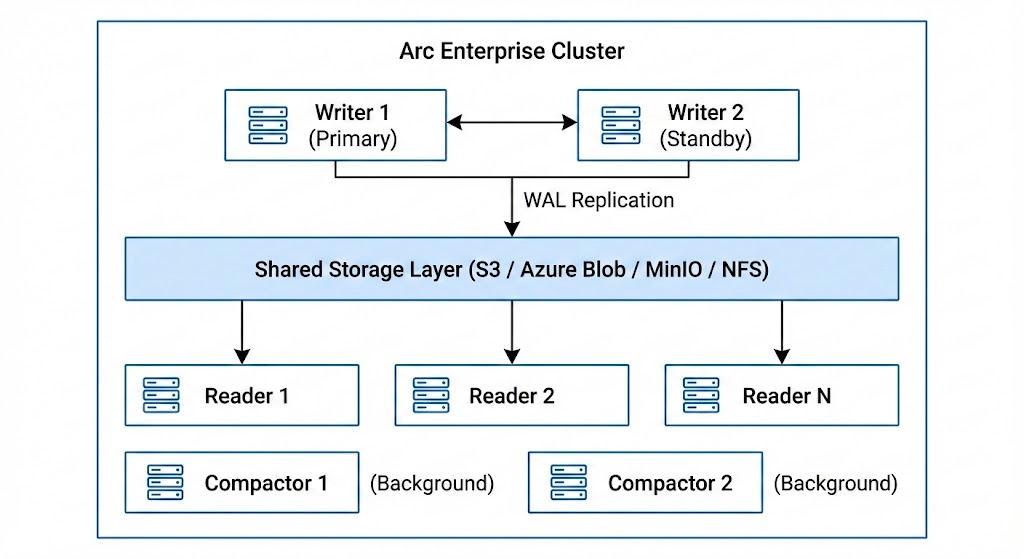
Multi-node clusters with dedicated writer, reader, and compactor roles. Automatic writer failover with sub-30-second recovery.
Role-Based Access Control
Organizations, teams, and roles with granular database and measurement-level permissions. Built on top of Arc's token authentication.
Tiered Storage
Automatic hot/cold data tiering with S3 Glacier and Azure Archive support. Reduce storage costs by 60-80% with zero query-time complexity.
Audit Logging
Comprehensive event tracking for compliance. Capture authentication, data access, RBAC changes, and infrastructure events with configurable retention.
Query Governance
Per-token rate limiting, query quotas, and row limits. Protect your cluster from runaway queries and ensure fair resource allocation.
Query Management
Monitor active queries in real time, review query history, and cancel long-running queries. Full visibility into your query workload.
Automated Scheduling
Automatic execution of continuous queries and retention policies on configurable schedules. Eliminate manual data lifecycle management.
MQTT Integration
Native MQTT subscription management with API-driven configuration. Connect to IoT brokers, extract tags from topics, and ingest at scale.
Configuration Example
A complete enterprise configuration combining multiple features:
# arc.toml — Enterprise deployment example

[license]
key = "ARC-XXXX-XXXX-XXXX-XXXX"

[server]
port = 8000

[storage]
backend = "s3"
s3_bucket = "arc-production"
s3_region = "us-east-1"

[auth]
enabled = true

[cluster]
enabled = true
node_id = "writer-01"
role = "writer"
cluster_name = "production"
seeds = ["10.0.1.10:9000", "10.0.1.11:9000"]

[tiered_storage]
enabled = true
default_hot_max_age_days = 30

[tiered_storage.cold]
enabled = true
backend = "s3"
s3_bucket = "arc-archive"
s3_region = "us-east-1"
s3_storage_class = "GLACIER"

[audit_log]
enabled = true
retention_days = 90

[governance]
enabled = true
default_rate_limit_per_min = 60
default_max_queries_per_hour = 500

[query_management]
enabled = true
Contact
To get started with Arc Enterprise, request a trial, or learn more about licensing:
- Email: enterprise@basekick.net
- Discord: Join our community